
Thumb Joint Pain at the Computer? Start with How You Grip

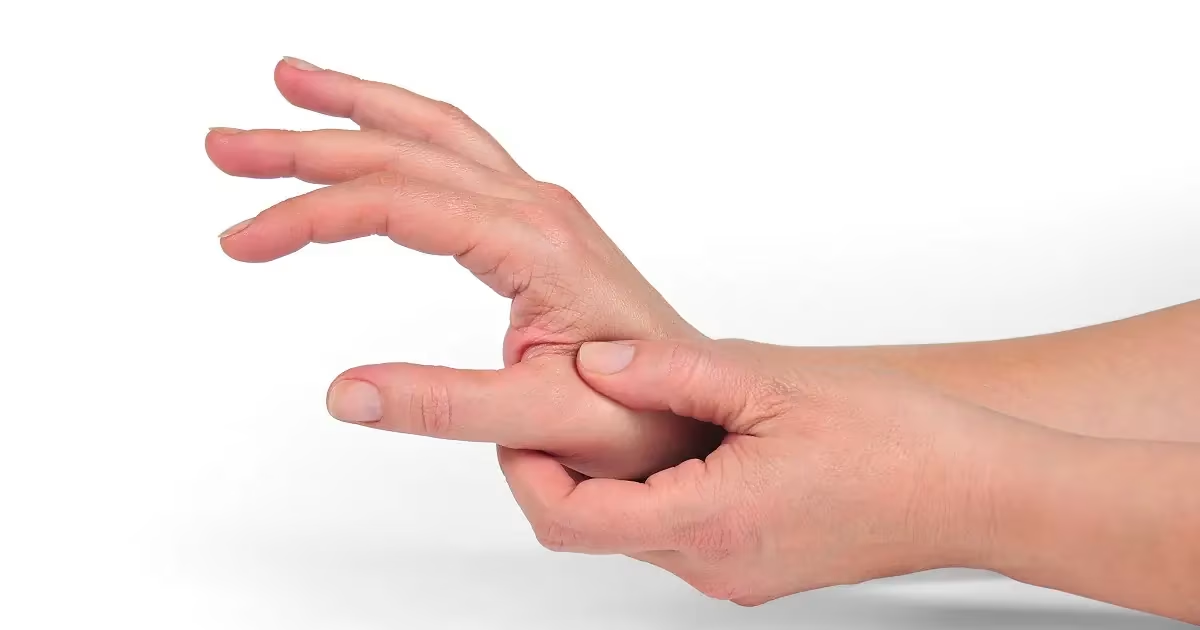
Thumb joint pain at the computer usually traces back to one quiet habit: how hard you grip the mouse. All day your thumb clamps the sides, props your hand up, and pinches to hold the mouse steady while your fingers click. The strain builds so slowly you barely notice, until one evening you twist open a jar and it bites. The good news is in there too, if your grip is feeding the pain, your grip is also where the fix starts.
Here's the part most guides skip, that constant low-grade squeezing is exactly what the joints end up paying for. In a case-control study of young adults with thumb pain from heavy device use, researchers measured lateral and tip pinch strength as "significantly reduced in the cases compared with controls", with tenderness clustered across the thumb's joints, especially the knuckle most of all. Overwork the thumb, and the joints are where it shows.
Four conditions cause most thumb joint pain at a desk, and your everyday mouse feeds every one of them, mostly through that constant gripping and pinching.
On This Page
- The Four Reasons Your Thumb Hurts at the Computer
- Why Your Regular Mouse Keeps the Ache Going
- The Design Changes That Take Load off Your Thumb
- If Your Work Is Editing-Heavy, Move Work off the Mouse
- How to Relieve Thumb Joint Pain Today
- What Helps When a Lighter Grip Is Not Enough
- When to Get It Checked
- Frequently Asked Questions
- Start with One Change
The Four Reasons Your Thumb Hurts at the Computer
Your thumb has three joints, and where it hurts tells you a lot. The base joint, the CMC, where the thumb meets the wrist, is the most mobile and the most exposed, so it soaks up most of the gripping and pinching. The knuckle (the MCP) and the little joint up near the nail (the IP) tend to flare when you press or bend the thumb. All three feel repetitive load, and the four conditions below each hit a bit differently. Work out where your pain is located and what sets it off, and you're halfway to fixing it.
De Quervain's Tenosynovitis
This is the one people most often mistake for a wrist problem. De Quervain's is irritation of the two tendons running along the thumb side of your wrist, where they squeeze through a snug tunnel called the first dorsal compartment. The giveaway is pain on the thumb side of the wrist that flares up when you grip, pinch, or stretch the thumb out. Doctors confirm it with the Finkelstein test: tuck the thumb into a fist, bend the wrist toward your little finger, and a sharp tug along the tendon gives it away.
Why does a desk job feed it? Repetition under tension. Holding a mouse keeps the thumb slightly splayed and braced for hours, and those tendons drag through that tight tunnel with every little move. Our explainer on de Quervain's tenosynovitis goes deeper if you want to learn more. The honest version of the science: repetitive load does not so much cause the condition as inflame an already cranky tendon, and easing that load is what tends to calm it.
Arthritis at the Base of the Thumb (Basal Joint)
This is the deep, grinding one. Basal thumb arthritis, also called basal joint or CMC arthritis, is osteoarthritis in the joint where your thumb meets your wrist. Over the years the protective cartilage that cushions that joint wears thin, the bones start to grind, and that friction can stir up inflammation. Per Cleveland Clinic, the most common symptom is pain right at the base of the thumb. The other thumb arthritis symptoms usually follow: swelling, stiffness, a weakening grip, and sometimes a small bony bump, or bone spur, over the joint. A different type, rheumatoid arthritis, can hit the same spot, but that one is an inflammatory disease rather than simple wear and tear.
It is mostly about age and wear, not something your mouse invents. The American Academy of Orthopedic Surgeons lists the main risk factors as age over 50, a past thumb injury, loose joint ligaments, and sex: women are two to three times more likely to develop it. What your workday does is provoke an already vulnerable joint. The pain tends to surface first in the everyday tasks of daily life, opening jars, turning a key, grasping objects, and a hard mouse grip just piles on. Lighten that grip and the daily strain often settles, even though the arthritis itself will not reverse and the joint can stiffen and lose range of motion as it advances.
Trigger Thumb (Stenosing Tenosynovitis)
Trigger thumb is hard to miss. The thumb catches or clicks as you bend it, sometimes with a popping sensation, and can lock bent before snapping straight. What's happening underneath: the tendon that flexes your thumb thickens, or its sheath narrows, so it stops gliding smoothly. Early on it is just morning stiffness. Left alone, the thumb can lock up. Repeated hard gripping is a known trigger, which is how heavy mouse and tool use feeds it. If you want the full mechanics and the treatment path, our guide on how trigger finger develops applies straight to the thumb. Catching or locking? Get it looked at sooner rather than later, since early rest and splinting beat waiting it out.
Plain Old Overuse (Grip and Click Strain)
Not every sore thumb is a named diagnosis. A lot of it can be overuse, a thumb that never gets a breather. And here's the mechanism most people get backwards: on a traditional mouse, your index and middle fingers do the clicking, but your thumb does the holding. It presses into the side of the mouse to steer and steady it, and stretches over to hit any thumb buttons. Hours of low-grade bracing plus tiny, repeated moves is the recipe for a cumulative ache. The good news is this type of pain is the easiest fix. Give the thumb less to do, a lighter grip, fewer reaches, a device that supports it instead of making it clench, and the daily pain and strain dissipates. Aching, but nothing catches or grinds? This is probably you, and a setup change is the biggest single win you've got.
Why Your Regular Mouse Keeps the Ache Going

Line the four up and one thread runs through all of them, forceful, repetitive thumb use. A common experience for those who use a traditional mouse. You grip it to move it, brace it to hold it still, and pinch to stay precise. Your thumb is working even when nothing is happening on screen. That steady, low-grade tension is the real culprit, because tissue held tight for hours never gets the recovery it needs, and the joints quietly absorb the strain.
To be clear, this does not mean a mouse causes arthritis or de Quervain's. What a mouse does is set your daily load. And your daily load is something you can change, often with ergonomic tools that reduce stress on the thumb and ease the strain that makes a sore joint flare.
There is a setup trap people miss while they are busy swapping mice. Where the mouse sits often matters more than which mouse it is. Park it too far forward or out to the right, and your hand reaches and cocks sideways for hours, which loads the thumb far more than the clicking ever does. Pull it back in line with your keyboard, close to your body, before you change a single thing.
And one culprit hides in plain sight. Your phone. The same thumb that grips the mouse all day is the one scrolling all evening. If it is already irritated, those hours pile onto the same joint. Scroll with a finger, or pass the phone to your other hand, to give your thumb a real shot at recovering overnight.
The Design Changes That Take Load off Your Thumb
The principle is simple, stop making your thumb grip and brace all day. Two designs pull that off, and they suit different hands and different work. If you want to see how they compare with the wider field, our guide to the best ergonomic mouse breaks down the main types.
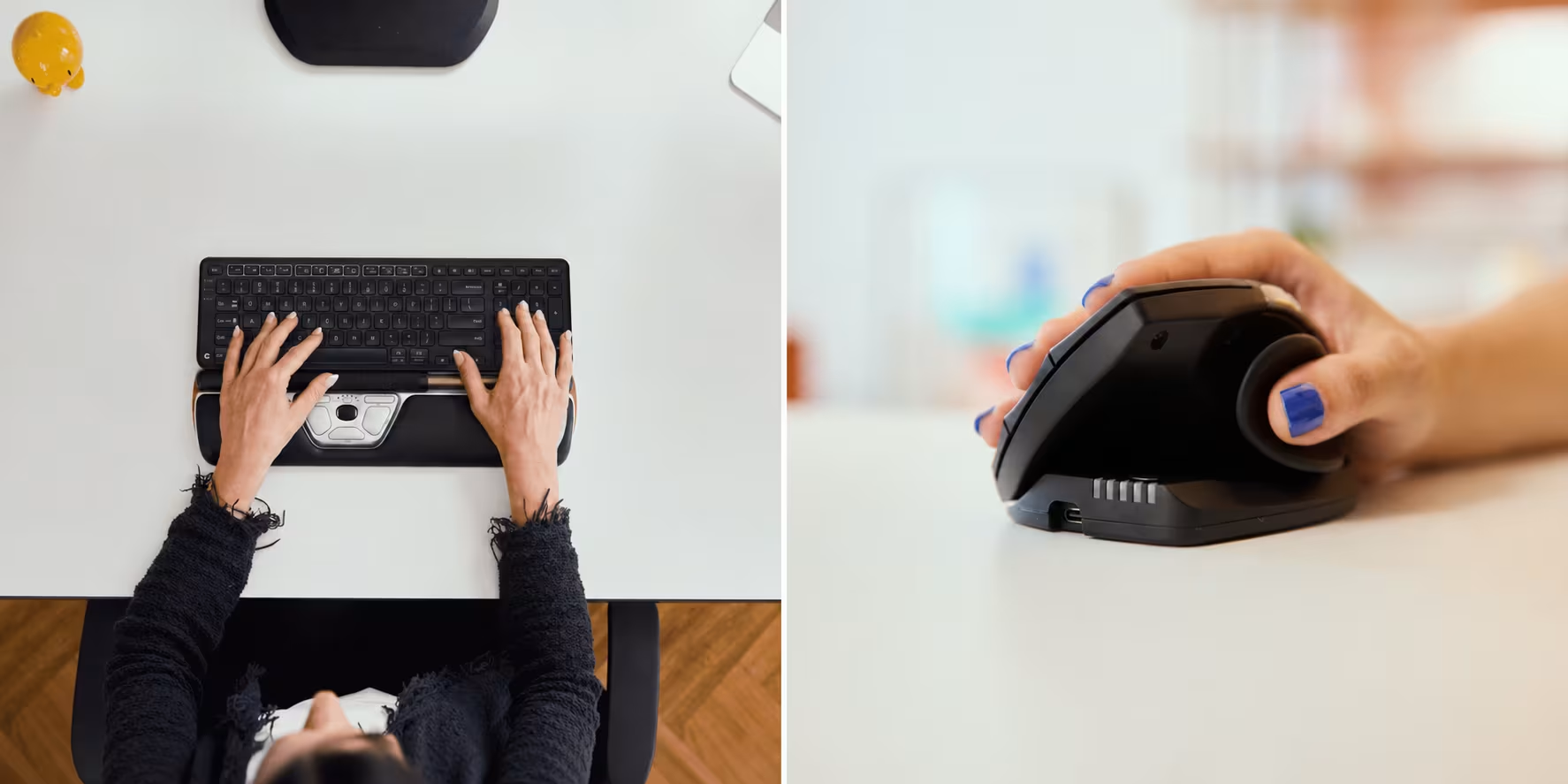
The first removes the grip entirely. A centered control like the RollerMouse Red sits right in front of your keyboard instead of off to one side, so there is no mouse body to clutch and no thumb button to stretch for. You move the cursor with light fingertip pressure on a rollerbar, and your thumb just rests. There are real measurements behind this, not just a marketing pitch. In a 2015 study in Applied Ergonomics, a centered rollerbar gave the most neutral wrist posture and the lowest forearm-muscle activity of the four devices tested, and people reported the least discomfort using it. The evidence is not unanimous, and one 2014 study found the muscle-activity difference small even though users still preferred the rollerbar, so the honest read is lighter load and more comfort for most people, not a miracle. Because it also kills the sideways reach required for a traditional mouse forces, a centered design is the one to look at when your pain has crept up into the wrist, forearm, or shoulder.
The second supports the thumb instead of working it. The UniMouse is a handheld vertical mouse with a thumb rest that adjusts five ways (slide, pivot, rotate, and angle the thumb rest until it fits like it was made for you), so your thumb settles into a cradle rather than pinching to hold the mouse. Its handshake angle tilts anywhere from 35° to 70°, which relaxes the forearm too. A 2013 study in Ergonomics backs the idea: a vertical mouse lowered forearm pronation and wrist-extensor activity compared with a flat mouse. Here is the honest catch from that same study: people needed a week or two of practice before their speed caught up. The first few days feel slow, and most settle in by the second week. If your trouble is wrist- and thumb-focused, or you want fine fingertip control, this is the more natural fit.
Neither one is a cure, and neither replaces a clinician when a joint is genuinely in pain. Plenty of people land on a two-device setup, a UniMouse for precise work and a RollerMouse for everything else, so the thumb gets variety instead of the same workload all day. Either way the goal is the same. Less pinch, less brace, fewer reaches.
If Your Work Is Editing-Heavy, Move Work off the Mouse
Sometimes the fix is not a different mouse at all. If your day lives in a video timeline, an audio session, a photo editor, or a heavy coding setup, a big chunk of your thumb's workload is repetitive scrubbing, scrolling, and shortcutting. Move those off the mouse and the strain drops on its own. A jog and shuttle controller like the Contour Shuttle handles scrubbing and frequent commands with a jog wheel, a shuttle ring, and programmable buttons, and it is designed so people can use it with their non-dominant hand as a scrolling alternative, so the sore thumb actually gets a break. It works alongside your mouse, not instead of it, and it will not heal a joint on its own. But for heavy-input work, fewer mouse trips mean fewer grip-and-click cycles landing on your thumb. If your work is drag-heavy, your operating system's click-lock setting helps too, since you tap once to start a drag instead of holding the button down.

How to Relieve Thumb Joint Pain Today
You do not need new gear to start feeling better today. Taking the load off your thumb, and a few changes do far more than the rest.
Start with the two that cost nothing and matter most. First, pay attention to how hard you are gripping. Most of us clutch the mouse far tighter than the job needs, all day, without noticing it. Let your hand rest on it instead of squeezing, and re-check every few minutes until a loose grip becomes automatic. Second, move the mouse closer. If you are reaching forward or out to the side for it, that reach is loading your thumb more than any click. Bring it back in line with your keyboard, near your body.
From there, give your thumb regular breaks. Every 20 to 30 minutes, open your hand all the way and stretch the thumb out from your palm for a few seconds. These simple hand exercises ease stiffness and keep the thumb flexible. It sounds trivial. Across an eight-hour day it is the difference between recovery and a slow grind. And do not forget the after-hours load. The same thumb scrolling on your phone all evening never gets to rest, so scroll with a finger or switch the phone to your other hand.
For an active pain flare up, cold helps. An ice pack on the sore joint for 5 to 15 minutes, a few times a day, can reduce pain, inflammation, and swelling, which is what both Cleveland Clinic and Mayo Clinic suggest. If stiffness is the bigger problem, heat from a heating pad boosts blood flow and soothes tight muscles. And if the joint is really angry, a short stint in a thumb splint can stabilize it and ease the pain. Just use it sparingly and keep the thumb moving so it does not stiffen up.
Give this a week of lighter, smarter use. If the ache is easing, you are on the right track, and switching to a device that fits your grip will lock it in. If in a week nothing changes, that is your cue to rethink the device, and if the pain is sharp, locking, or lingering, to see a clinician.
What Helps When a Lighter Grip Is Not Enough
Easing your grip and using tools that take strain off the thumb joints clears up most early cases, and that ergonomic fix is always the first line. When it is not enough on its own, the proven next steps stay simple and conservative. The home remedies above, rest, temperature therapy, and a splint, do most of the work. From there, a short course of oral medications like nonsteroidal anti-inflammatory drugs (NSAIDs) helps manage pain, and hand therapy, also called physical therapy, rebuilds thumb strength and flexibility, with regular hand exercises to keep both up over time. Keeping a healthy weight helps too, since extra weight is linked to a higher risk of hand and thumb osteoarthritis.
If those are not enough, a clinician has more to offer. A corticosteroid injection, or cortisone shot, can give temporary pain relief for several months. For a trigger thumb that keeps locking, a minor procedure called tendon release frees the tendon, so it glides smoothly again. Surgery is the last resort for advanced arthritis, where the main options are joint fusion or joint replacement. Most people never get near that step, especially when they cut the daily load early.
When to Get It Checked
A lighter grip and a little patience clear up most desk-related thumb pain, but symptoms that stick around deserve a look from a healthcare professional. That visit usually starts with a physical examination to pin down the cause, and an X-ray can reveal joint damage such as bone spurs. Some signs mean you should go sooner than later: a thumb that locks or catches when you bend it, pain that wakes you at night, swelling or a visible change in shape at the base, or grip and pinch strength that keep slipping. A sudden injury is its own category: a fall or hard wrench that tears the thumb's ligaments, known as skier's thumb, needs prompt care, not a setup change. For stubborn cases, orthopedic surgeons can map out a treatment plan, up to surgery, though most people never need it. If you want a plain-language look at thumb arthritis and how it is treated, Healthline's overview of thumb arthritis is a good start. This article is general information, not medical advice, so let a professional assess anything that doesn't resolve itself.
Frequently Asked Questions
How do I relieve thumb joint pain from computer use?
Start by lowering the load. Loosen your grip, take a short break every 20 to 30 minutes, and move repetitive clicks and scrolling onto keyboard shortcuts or your other hand. Ice an active flare up for 5 to 15 minutes, and rest or briefly splint the joint. If a week of lighter use does not help, change the device or see a clinician.
What causes thumb joint pain at the computer?
Repetitive gripping, pinching, and clicking are the usual drivers. Four conditions account for most cases: De Quervain's tenosynovitis, base-of-thumb (CMC) arthritis, trigger thumb, and plain overuse strain. A standard mouse feeds all four because the thumb grips and braces it for hours. Phone scrolling on the same thumb adds to the daily total.
Why does my thumb joint hurt when I press or bend it?
It depends on which joint. Soreness at the small joint near the nail, the IP joint, when you press on it usually means that joint or its tendon is irritated from repetitive use, and sometimes early osteoarthritis. Catching, clicking, or a painful snap when you bend the thumb points more toward trigger thumb, where the tendon no longer glides smoothly. Press-or-bend pain that lingers past a week or two is worth a clinician's exam.
Why does my thumb hurt when I grip or pinch?
Gripping and pinching load the base of the thumb hardest, so that is where overuse shows up first. Sharp pain on the thumb side of the wrist when you pinch points toward De Quervain's, while a deep ache right at the base points toward arthritis. Either way, a lighter grip and fewer forceful pinches reduce the daily strain.
I've tried several mice and my thumb still hurts. What am I missing?
The mouse is only half the problem. Where it sits matters as much as its shape. Too far forward or to the side, and your hand reaches and cocks for hours. Total load reduction, rest, and rehab matter too. A better device helps, but it will not undo overuse on its own, so pair it with breaks, position changes, and, if pain lingers, physical therapy.
Can switching the hand or finger I click with help?
It can spread the load, which is why some people alternate hands or change which finger clicks. It is a relief tactic, not a cure, and a new pattern feels awkward for a week or two. A centered, ambidextrous device makes hand-switching easier, since both hands reach it the same way.
Which doctor should I see for thumb joint pain?
Start with a primary care doctor, who can rule out red flags and point you onward. For a clear diagnosis and a treatment plan, ask for a hand specialist (an orthopedic or plastic hand surgeon) or a hand therapist or physiotherapist. If you are offered only supplements, it is reasonable to request a referral for a hands-on assessment.
Is thumb joint pain the same as carpal tunnel syndrome?
No. Carpal tunnel involves the median nerve compressed at the wrist, with tingling or numbness across the thumb, index, and middle fingers. Thumb joint pain is centered on the thumb itself, most often at the base, and tends to be sore, achy, or catching rather than tingling. The two can overlap, so a clinician should sort out which you have. If carpal tunnel turns out to be the culprit, our guides on the best mouse for carpal tunnel and how to prevent carpal tunnel syndrome cover what to do next, and our carpal tunnel relief guide lists the desk fixes that ease symptoms you already have.
Should I switch to a trackball for thumb pain?
It depends on the trackball. Thumb-operated trackballs ask the sore joint to do even more work, so they often make thumb pain worse. A finger-operated trackball shifts the effort to your fingers, and a no-grip centered design removes the gripping altogether. If the thumb is the problem, avoid any device that puts the thumb in charge of moving the cursor.
Start with One Change
Do not overhaul everything at once. Pick the single easiest move from above, loosen your grip, or pull the mouse closer, and try it for a week. See if the evening aches dissipate. If your hand needs more than habits, our Help Me Choose tool points you to the device that fits where your pain actually lives. Your thumb has carried every workday for years. Give it a setup that finally lets it rest.

Which Device Is Right for You?
Take a quick quiz and get a personalized recommendation based on how you work.

