
Mouse With Roller: The Smarter Way to Work Pain-Free at Your Desk
.avif)
Your mouse with roller might be the single most effective change you make to your workstation this year. If you've spent years fighting wrist pain, shoulder tension, or forearm fatigue, the problem isn't how hard you work. It's the tool you're using to do it.
Traditional mice force your hand into unnatural positions for hours. A roller mouse eliminates that entirely. This guide breaks down how roller mice work, who they help most, and exactly what to look for before you buy one. For a broader overview, start with our guide to the best ergonomic mouse.
Key Takeaways
- A mouse with a roller eliminates repetitive strain injuries by keeping your hands centered and in a neutral position, removing thousands of micro-movements that traditional mice demand daily.
- The ergonomic design of roller mice reduces shoulder rotation, forearm pronation, and wrist deviation, supporting better posture automatically without requiring conscious positioning adjustments.
- Roller mice work best for professionals working 6+ hours daily at computers—including software engineers, designers, and writers—who experience wrist, forearm, or shoulder pain from traditional pointing devices.
- Key features to prioritize when choosing a roller mouse include adjustable cursor speed, smooth scrolling methods, platform compatibility, and solid build quality to ensure long-term reliability.
- Unlike trackballs or vertical mice, a mouse with a roller removes device movement entirely, delivering deeper stress reduction for those with active RSI symptoms like carpal tunnel or tendinitis.
What Is a Mouse With a Roller — and How Does It Work?
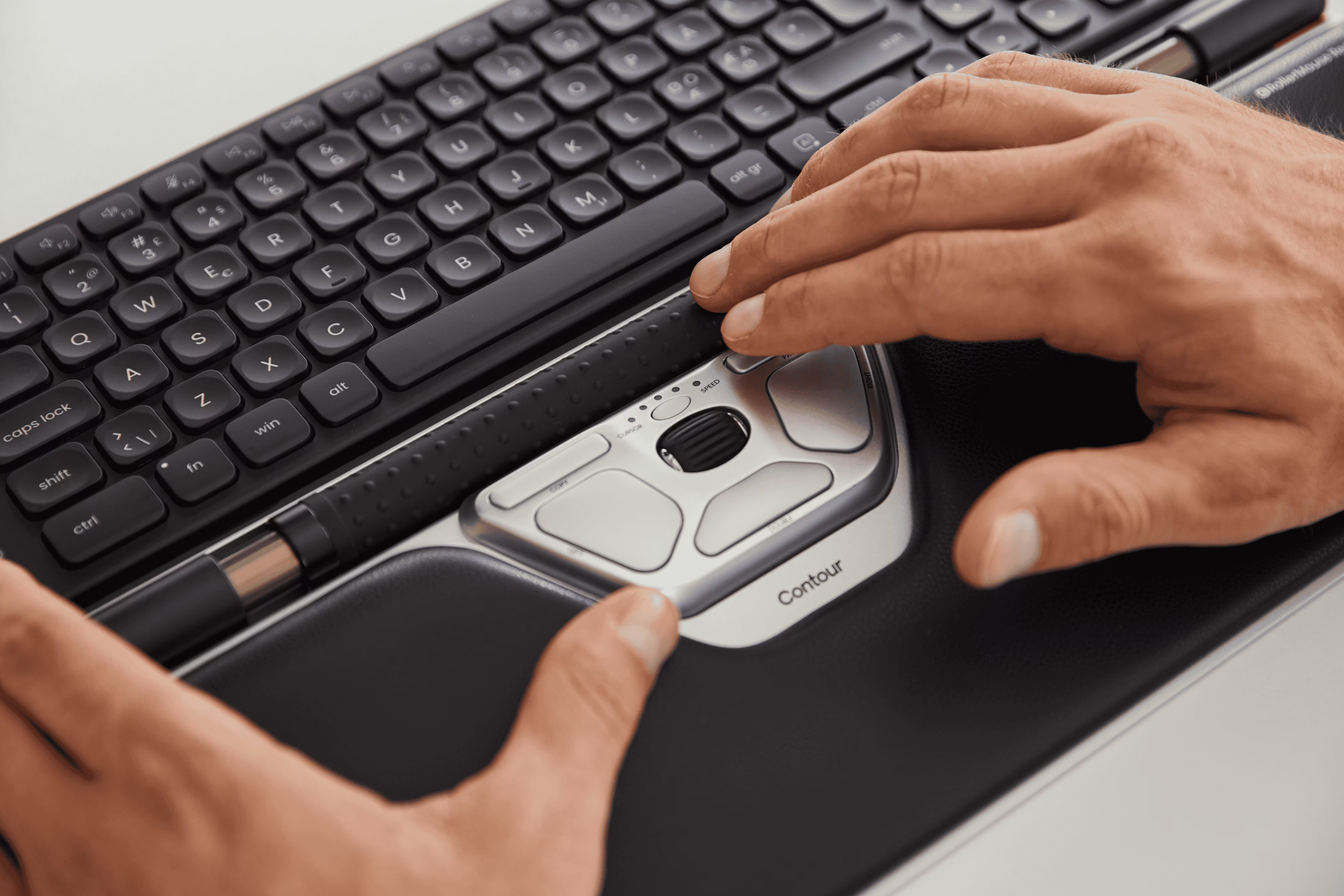
A mouse with a roller is a stationary ergonomic input device that sits centered in front of your keyboard. Instead of moving a mouse across a pad, you control the cursor by sliding and rolling a central rollerbar with your fingertips. Sliding it left or right moves the cursor horizontally. Rolling it forward or back moves it vertically.
No reaching. No lifting. No repetitive wrist extension.
Contour Design’s RollerMouse lineup is one well-known example of this centered approach. If you want a bundled setup, the RollerMouse Red Plus + Balance Keyboard, Wireless option is one product to compare.
Which means you're not gripping a device and dragging it around a surface hundreds of times per hour. The rollerbar does the work, your fingers guide it, and your arm stays relatively still.
According to a CDC pointing device study, different mouse designs can produce measurably different upper-extremity muscle activity. That’s why design choice matters when you’re trying to reduce strain, not just cope with it.
Why Traditional Mice Keep Hurting You (And What's Different About a Roller Mouse)
Standard mice demand constant micro-movements: lifting your hand, extending your arm, twisting your wrist, and clicking repeatedly. Over a full workday, that adds up to thousands of small, repetitive motions. Over months and years, those motions can contribute to repetitive strain injuries (RSI), including carpal tunnel syndrome, tendinitis, and shoulder irritation.
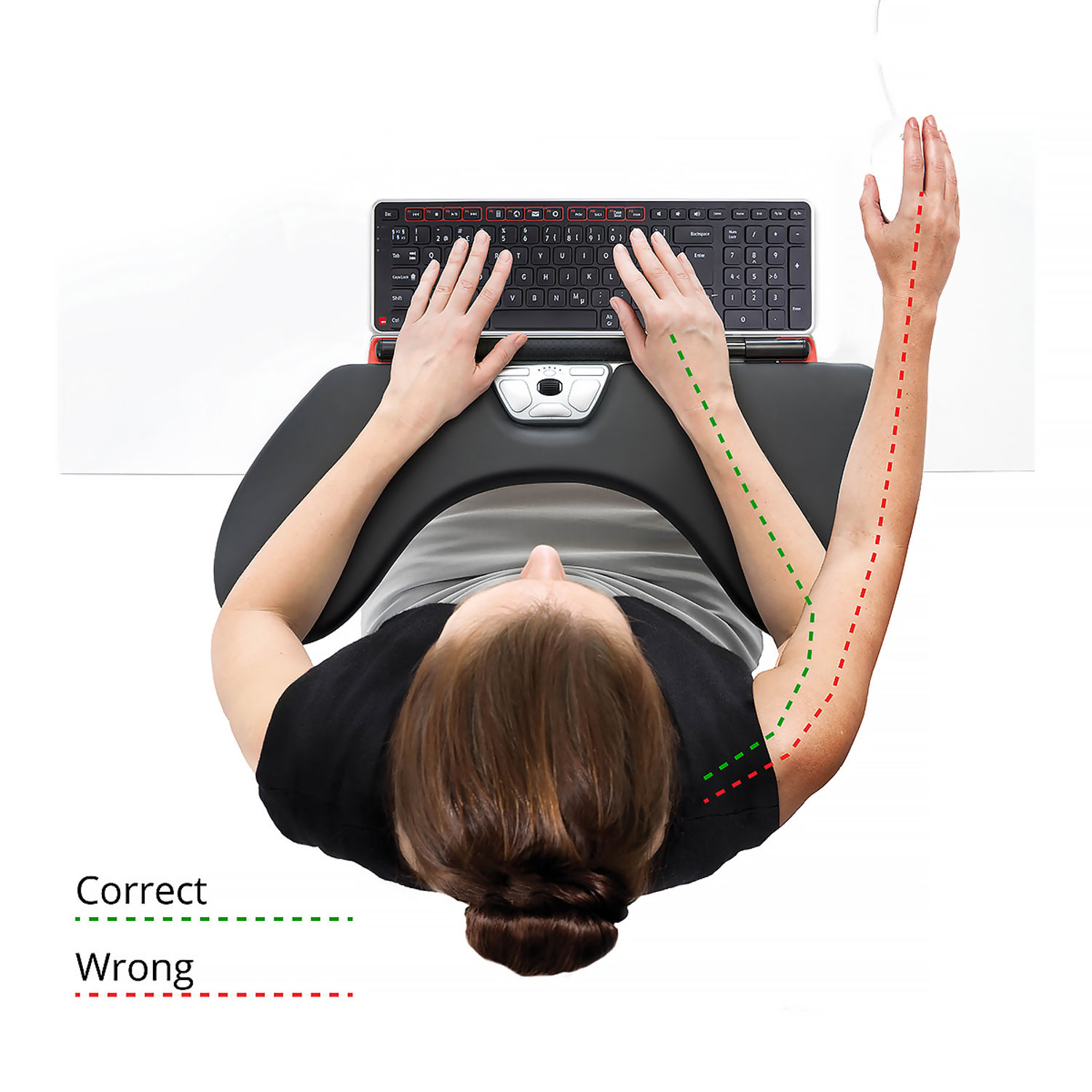
The core problem is arm extension. Every time you reach for a traditional mouse, you pull your shoulder forward and rotate your forearm. Your neck and upper back compensate. The tension builds.
Keeping devices close to the body and minimizing wrist deviation is a consistent recommendation in ergonomics guidance, including the CCOHS wrist ergonomics guidelines. A roller mouse makes that easier by design because it stays centered.
Centered placement also reduces how far your arm has to travel away from your body. These benefits of a centred mouse are one of the simplest reasons roller designs can feel “instantly” different for people with shoulder tension.
If you feel shoulder tightness by 2pm, your mouse placement is almost certainly part of the cause. If you want the shoulder mechanics broken down, start with this overview of computer mouse shoulder strain and how reach affects posture.
The Ergonomic Benefits That Make a Roller Mouse Worth It
Switching to a roller mouse isn't just about comfort. It's about sustaining your ability to do your best work without your body breaking down in the process.
The core ergonomic advantage is posture by default. You don't have to remember to sit correctly or position your arm at the right angle. The roller mouse design helps make the neutral position easier to maintain. Your hands land naturally. Your shoulders stay back. Your wrists stay flatter.
A roller mouse also supports smoother scrolling and more deliberate cursor control, which can mean less re-gripping and fewer reach corrections across long sessions in spreadsheets, writing apps, and IDEs.
This is also where many people compare roller mice to trackballs. Trackballs reduce the need to move the device itself, but you still manipulate a ball and often keep one arm abducted. If you’re weighing options, this computer mouse roller ball guide is a helpful comparison point before you commit.
Less Strain on Your Wrist, Forearm, and Shoulder
With a roller mouse, your hands stay in a neutral position: flat, relaxed, and forward-facing. There's no ulnar deviation (angling your wrist outward), no gripping force, and no rotating your forearm to chase a cursor.
This is meaningfully different from trackballs. A trackball like the Logitech MX Ergo S offers a 20-degree tilt that reduces forearm strain by roughly 27%. That's a real improvement. But a roller mouse removes the ball-manipulation motion entirely, which cuts wrist and shoulder stress further.
For anyone dealing with active RSI symptoms, this difference matters. Getting rid of pain and strains starts with removing the root cause, not just adjusting the angle of the same problematic motion.
Do this now: Rest both hands flat on your desk with fingers relaxed. That's the position a roller mouse keeps you in. Compare it to how your hand sits on your current mouse.
Who Benefits Most From a Mouse With a Roller?
A roller mouse isn't for everyone. But for certain people, it's a genuinely life-changing upgrade. If you're ready to switch, consider what the Contour RollerMouse is.
You'll benefit most if you:
- Work 6+ hours daily at a computer
- Have a diagnosed RSI condition like carpal tunnel, tendinitis, or thoracic outlet syndrome
- Experience wrist, forearm, or shoulder pain that worsens through the day
- Spend long sessions in design tools, spreadsheets, writing apps, or IDEs
- Have tried wrist rests and vertical mice without consistent relief

Software engineers, graphic designers, architects, video editors, data analysts, and writers are the professionals who see the biggest gains. These roles involve sustained, precise cursor work over long sessions.
Health and safety specialists sourcing equipment for teams will also find roller mice practical at scale. They reduce the individual ergonomic configuration burden, since the centered design works for most users without heavy customization.
A roller mouse is not the right fit if you need a highly portable device, work primarily on a laptop on-the-go, or rely on gaming-level cursor responsiveness for fast-twitch precision tasks.
For those doing precision work with a vertical mouse or exploring ergonomic upgrades broadly, a roller mouse represents the next tier of stationary, body-centered design.
What to Look for When Choosing the Right Roller Mouse
Not all roller mice are equal. Here’s what actually matters when comparing options.
Adjustable cursor speed. You need control over how far the cursor travels per millimeter of rollerbar movement, especially on large monitors or multi-screen setups.
Scrolling method. Look for smooth scrolling that doesn’t require you to lift your hand or re-grip constantly.
Platform compatibility. Confirm the device works with your OS (Windows, macOS, or both). Plug-and-play is a real advantage because it reduces setup friction.
Build quality and adjustability. Roller mechanisms should feel solid and consistent. Look for reliable buttons and ergonomics that match your hand size and desk setup.
Fit for your workflow. A video editor navigating a timeline has different needs than an accountant working through spreadsheets. Cursor precision, button layout, and scrolling speed all factor in.
If you’re also adjusting your workstation more broadly, this guide to reduce pain with an ergonomic mouse is a useful checklist for setup, habits, and device fit—not just buying specs. For more on the shoulder side of this, read about how to find mouse shoulder relief.
If you're not sure which ergonomic mouse to choose, our Help Me Choose Tool narrows it down and finds the mouse that fits you in under a minute.
Conclusion
A mouse with a roller removes the root cause of repetitive strain, not just the symptoms. It keeps your hands centered, your posture natural, and your body out of the cycle of daily pain that grinds down your focus and your health.
If you work long hours at a screen, you owe it to yourself to try one. Your wrists will notice the difference by end of day one.
Frequently Asked Questions About Roller Mice
What exactly is a mouse with roller and how does it work?
A mouse with roller is a stationary ergonomic device you place in front of your keyboard. Instead of moving the device, you control the cursor by sliding and rolling a central rollerbar with your fingertips—left/right for horizontal movement, forward/back for vertical movement. Your hands stay centered and relaxed without reaching or gripping.
How does a roller mouse help with wrist and shoulder pain?
A mouse with roller eliminates arm extension and wrist twisting that traditional mice require. Your hands remain in a neutral, flat position without ulnar deviation or gripping force. This removes the root cause of repetitive strain injuries, reducing neck, shoulder, forearm, and wrist tension throughout the day.
Is a roller mouse better than a trackball mouse?
Yes. While a trackball like the Logitech MX Ergo S reduces forearm strain by roughly 27%, a mouse with roller removes the ball-manipulation motion entirely, cutting wrist and shoulder stress even further. It also requires no learning curve and maintains natural hand positioning automatically.
Who should use a roller mouse?
A roller mouse benefits professionals working 6+ hours daily at a computer, especially software engineers, designers, architects, video editors, data analysts, and writers. It's ideal for anyone with diagnosed RSI conditions like carpal tunnel or tendinitis, or those experiencing persistent wrist, forearm, or shoulder pain that worsens through the day.
What features should I look for when choosing a roller mouse?
Look for adjustable cursor speed to match your monitor setup, smooth scrolling methods that don't require hand lifting, and platform compatibility with Windows and Mac. Verify build quality, programmable buttons, and that the device fits your specific workflow needs.
Can I use a roller mouse if I work on the go with a laptop?
No, a mouse with roller isn't designed for portable or mobile use. It's a stationary device that requires a dedicated desk setup. If you need portability, consider an ergonomic laptop alternative, but a roller mouse excels for anyone with a permanent workstation.

Which Device Is Right for You?
Take a quick quiz and get a personalized recommendation based on how you work.

