
Mouse Shoulder Ergonomics: How to Stop Shoulder Pain Before It Stops You

Mouse shoulder ergonomics is one of those topics most people discover too late. You're deep into a project, hours into your workday, and a dull ache starts creeping from your shoulder blade up into your neck. You roll your shoulder, push through it, and keep going. Days later, it's worse.
This is how repetitive strain injuries start. The good news: the right posture, equipment, and habits can stop this pattern before it becomes a real problem. Here's exactly what you need to know. For a broader overview, start with our guide to the best ergonomic mouse.
Key Takeaways
- Mouse shoulder ergonomics relies on positioning your mouse close to your body with your upper arm relaxed at your side to reduce continuous muscle tension and prevent repetitive strain injuries.
- Keeping arm abduction below 10 degrees from your body can reduce shoulder muscle activity by 25–60%, making mouse placement just a few inches closer one of the most effective adjustments you can make today.
- Ergonomic mouse options like vertical mice, trackball mice, and centered roller devices provide varying benefits for shoulder relief depending on your specific strain patterns and work habits.
- Breaking every 30 minutes, practicing shoulder drops, and maintaining neutral posture prevent the static muscle contraction that causes mouse-related shoulder pain to develop over time.
- Adjusting your workstation—including monitor placement, chair armrests, and desk height—works alongside mouse ergonomics to eliminate shoulder strain, as proper positioning is more effective than equipment alone.
- If shoulder pain is sharp, persistent, or radiating, consult a physical therapist or occupational health professional, as ergonomic changes support recovery but cannot replace clinical care for diagnosed injuries.
Why Your Mouse Is Wrecking Your Shoulder

Most people blame their chair or their posture when shoulder pain hits. The real culprit is often sitting right next to your keyboard.
Mouse shoulder is a repetitive strain injury (RSI) caused by holding your arm in an extended, unsupported position for hours at a time. When your mouse sits too far away or too high, your shoulder muscles contract continuously just to keep your arm in place. They never fully rest. Over a full workday, that constant low-level tension adds up to significant muscle fatigue and, eventually, pain.
According to research on work-related musculoskeletal disorders, upper limb and neck MSDs are among the most common occupational health issues affecting office workers. Even less than one hour of daily mouse use can sustain this strain once your muscles have already developed a pattern of tension.
For a deeper look at why this happens specifically with mouse use, why your shoulder hurts from mouse use is worth reading before you make any changes to your setup.
Start here: Observe where your mouse hand sits right now. Is your upper arm relaxed against your side, or is it lifted and reaching outward? That one observation tells you a lot.
The Anatomy of Mouse-Related Shoulder Strain
Your shoulder doesn't attach to your skeleton the way your hip does. It's held in place almost entirely by muscles that connect to your spine, ribcage, neck, and the base of your skull. That means poor arm positioning doesn't just stress the shoulder joint. It creates a chain reaction of tension across your entire upper body.
Common triggers include:
- Static posture with little movement variation throughout the day
- Repetitive reaching that keeps specific muscle groups contracted
- Muscle imbalances from using only one side of the body for mouse control
- Tendon stress from gripping and fine motor movements over long periods
Research published in the International Journal of Exercise Science found that work-related musculoskeletal disorders in the neck and shoulder region are especially common in office workers who hold static positions for extended periods.
Reach, Elevation, and the Hidden Cost of Awkward Positioning
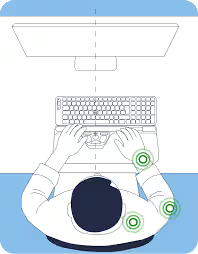
Where your mouse sits relative to your body matters more than most people realize.
- Mouse placed too low: You're constantly reaching down, which pulls on shoulder stabilizer muscles.
- Mouse placed too high: Your upper arm and neck muscles stay contracted to hold that elevated position.
- Mouse placed too far away: Reaching forward or sideways keeps your shoulder in continuous tension with no relief.
Studies show that keeping arm abduction (the outward angle of your arm from your body) below 10 degrees reduces shoulder muscle activity by 25–60%. That's not a minor difference. Bringing your mouse just a few inches closer can cut muscle workload nearly in half.
Ergonomic Principles That Actually Protect Your Shoulder
Good mouse shoulder ergonomics isn't complicated, but it does require intentional setup. These principles work together. Fixing one without addressing the others gives you partial results at best.
Core ergonomic rules for shoulder protection:
- Feet flat on the floor, with knees bent at roughly 90 degrees
- Elbows bent at 90 degrees, with your upper arm hanging relaxed at your side
- Mouse at the same height as your keyboard, positioned close enough that you don't reach for it
- Wrist in a neutral position: not bent up, down, or sideways while mousing
- Shoulders relaxed and down throughout your workday, not raised or hunched
The CCOHS guidelines on office ergonomics note that wrist rests can help maintain a neutral wrist position during pauses, not during active mouse movement.
If your desk sits too high for your elbows to reach 90 degrees, a keyboard tray that mounts below desk level is one of the most effective fixes available. It's a small investment compared to months of shoulder pain.
For a full breakdown of how ergonomic mouse design reduces pain, Contour Design's guide covers the science behind the setup in practical terms.
Do this today: Sit naturally at your desk, close your eyes, and let your arms fall relaxed at your sides. Note where your hands land. That's roughly where your mouse should be. If you're ready to switch, consider the Contour RollerMouse Pro3.
Choosing the Right Ergonomic Mouse for Shoulder Relief
Not all ergonomic mice address shoulder pain equally. Some are designed primarily for wrist comfort. Others are built with shoulder load reduction as the central goal.
Mouse types worth considering:
- Vertical mice: Hold your hand in a handshake orientation, which reduces forearm twisting and shifts some mechanical stress away from the shoulder.
- Trackball mice: Eliminate the need to move your arm across a surface entirely. You control the cursor with your thumb or fingers while your arm stays still.
- Centered roller devices (like the RollerMouse): Position the pointing device directly in front of you, centered on the keyboard, so both arms stay close to the body symmetrically. This is especially effective for shoulder strain because it removes lateral reaching completely.
Proper sizing matters too. A mouse that's too small causes you to grip tighter and overextend your fingers. A mouse that's too large forces awkward hand angles. Both add tension that travels up the arm into the shoulder.
If you're not sure which style fits your situation, Contour Design's tool for matching an ergonomic mouse to your needs asks the right questions to point you toward the right option.

Workstation Adjustments That Make a Real Difference
Buying an ergonomic mouse won't help much if your workstation positioning still forces your shoulder into a stressed position. The setup around the mouse matters just as much as the mouse itself.
High-impact adjustments to make now:
- Move your mouse closer to your body. Your upper arm should stay near your torso, not extended outward.
- Lower your mouse surface if it's above elbow height. Your elbow should be roughly level with or slightly higher than your mouse.
- Use a chair with adjustable armrests that support your forearms without raising your shoulders.
- Position your monitor directly in front of you to prevent twisting your torso while reaching for the mouse.
- Clear desk clutter on your mousing side. Objects that push your mouse further away are a common and overlooked cause of shoulder strain.
A randomized controlled trial on ergonomic workstation interventions found that targeted workstation adjustments significantly reduced musculoskeletal pain in office workers over a follow-up period. The adjustments weren't major overhauls. They were specific, deliberate changes to how existing equipment was positioned.
Try this: Set a timer for 5 minutes and adjust only your mouse position. Move it 3–4 inches closer to your body and lower it slightly. Work for 30 minutes and notice whether your shoulder feels less loaded.
Daily Habits to Keep Shoulder Pain Away for Good

Ergonomic equipment and a well-adjusted workstation create the right conditions. Daily habits are what make the relief last.
Build these into your routine: It also helps to pair the right hardware with these mouse arm syndrome exercises you can do at your desk.
- Break every 30 minutes. Stand up, drop your shoulders, and shake out your arms for 60 seconds. This interrupts the static muscle contraction that causes mouse shoulder.
- Practice shoulder drops. Throughout the day, consciously check whether your shoulders are raised. If they are, let them fall. Many people hold tension here for hours without noticing.
- Switch mousing hands occasionally. Training your non-dominant hand to handle basic tasks cuts shoulder load on your primary side by giving those muscles real recovery time.
- Do shoulder rolls and gentle neck stretches at the end of each work block. Consistent flexibility work maintains range of motion and reduces baseline tension over time.
- Keep your screen at eye level. Looking down at a monitor pulls your head forward, which loads the neck and shoulder muscles continuously.
Honest assessment: If your shoulder pain is sharp, persistent, or radiating down your arm, don't rely on habit changes alone. See a physical therapist or occupational health professional. Ergonomic adjustments support recovery but don't replace clinical care for diagnosed injuries.
If you're not sure which ergonomic mouse to choose, our Help Me Choose Tool narrows it down and finds the mouse that fits you in under a minute.
Frequently Asked Questions About Mouse Shoulder Ergonomics
What exactly is mouse shoulder and why does it happen?
Mouse shoulder is a repetitive strain injury (RSI) caused by holding your arm in an extended, unsupported position for hours. When your mouse sits too far from your body, shoulder muscles contract continuously to maintain that position, leading to fatigue and pain even with minimal daily use.
How can I tell if my mouse positioning is causing shoulder pain?
Observe where your upper arm sits right now: is it relaxed against your side, or lifted and reaching outward? Ideally, your upper arm should hang relaxed while your mouse stays close to your body at keyboard height. Research shows arm abduction under 10 degrees reduces shoulder muscle activity by 25–60%.
What are the best types of ergonomic mice for shoulder relief?
Vertical mice reduce forearm twisting by holding your hand in a handshake position. Trackball mice eliminate arm movement entirely. Centered roller devices like the RollerMouse position the pointing device directly in front of you, removing lateral reaching completely and protecting your shoulders.
How should I set up my workstation to prevent mouse shoulder?
Keep feet flat on the floor with elbows bent at 90 degrees. Position your mouse at keyboard height, close enough that your upper arm stays relaxed against your side. Use a keyboard tray if your desk is too high, and ensure your monitor is directly in front of you to prevent twisting while reaching.
What daily habits help prevent mouse shoulder pain?
Take a break every 30 minutes to stand and shake out your arms. Practice shoulder drops throughout the day to release tension. Switch mousing hands occasionally to give your primary side recovery time. Perform shoulder rolls and neck stretches regularly to maintain flexibility and reduce baseline tension.
When should I see a healthcare professional about shoulder pain from mouse use?
If your shoulder pain is sharp, persistent, or radiating down your arm, consult a physical therapist or occupational health professional. Ergonomic adjustments support recovery but don't replace clinical care for diagnosed injuries that require professional evaluation and treatment.

Which Device Is Right for You?
Take a quick quiz and get a personalized recommendation based on how you work.

