
Contour RollerMouse Red Plus Review: The Centred Mouse That Could End Your Wrist Pain for Good
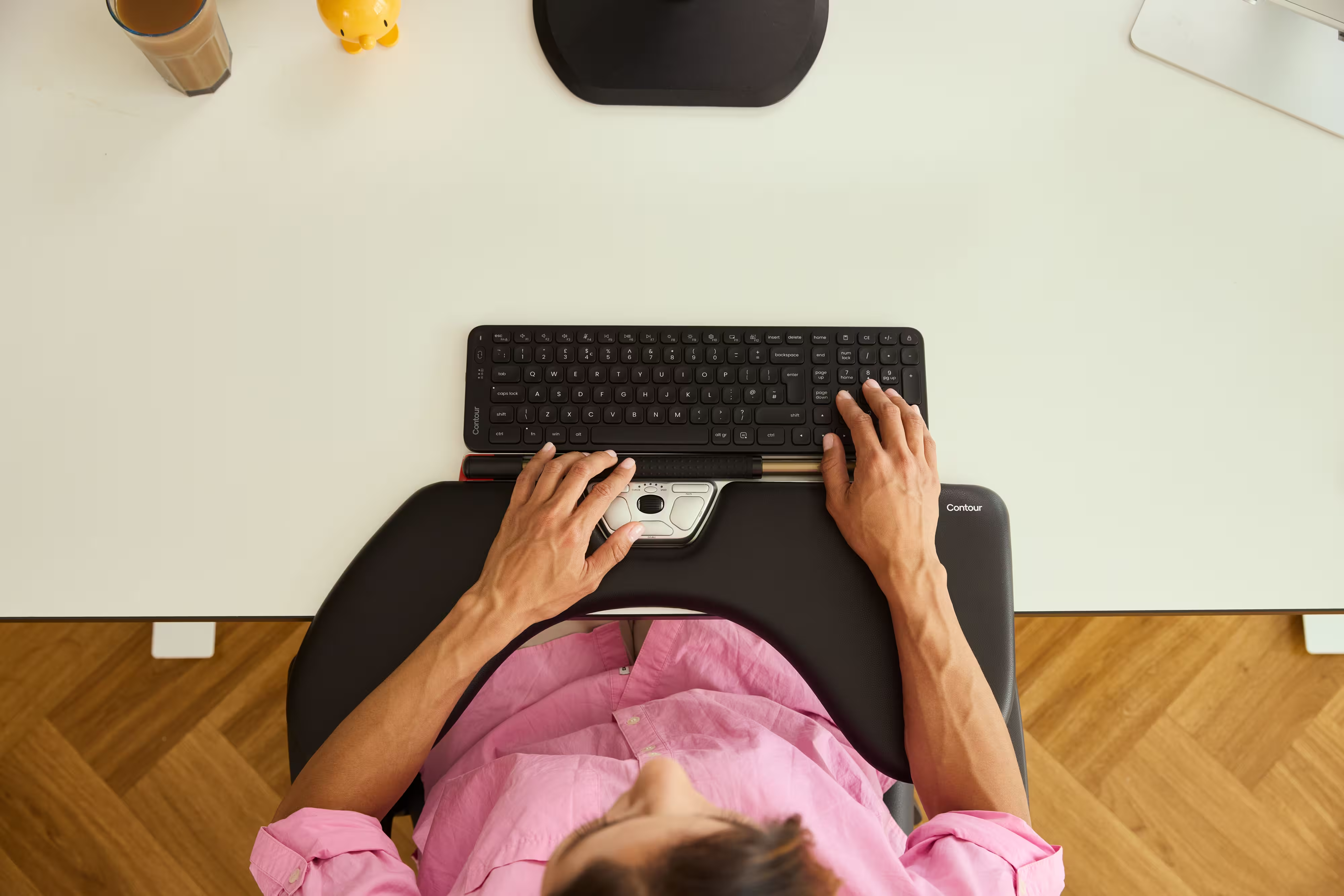
The Contour RollerMouse Red Plus sits in front of your keyboard, not beside it, and that single shift changes everything about how your hands, wrists, and shoulders feel after a long day of work. If you've clocked 6-10 hours daily at a desk and noticed persistent wrist strain, forearm tension, or that dull ache creeping into your shoulder, this device was engineered specifically for you. This review breaks down how it works, who it's built for, and whether it's worth the investment over other ergonomic options on the market.
Key Takeaways
- The Contour RollerMouse Red Plus eliminates wrist, shoulder, and forearm strain by positioning the cursor control directly in front of your keyboard instead of requiring a side reach and grip.
- The patented dual-sensor rollerbar provides precision cursor control without the sustained pressure of trackballs or the slip of trackpads, making drag-and-drop tasks more reliable.
- With adjustable DPI up to 2800, wireless/Bluetooth connectivity, and up to 3 months of battery life, the RollerMouse Red Plus integrates seamlessly into any workflow without software installation.
- The included 5-inch memory foam Plus wrist rest provides enhanced palm-to-forearm support, making it ideal for users with larger hands or long forearms who struggle with standard ergonomic mice.
- Research shows the RollerMouse Red Plus can increase work efficiency by up to 19% while reducing physical strain for keyboard-heavy professionals like software engineers, writers, and data analysts.
- The device is most effective for professionals managing RSI, tendinitis, or carpal tunnel, and less suitable for heavy graphic design work that requires sustained fine cursor pressure.
What Makes the RollerMouse Red Plus Different from a Standard Mouse
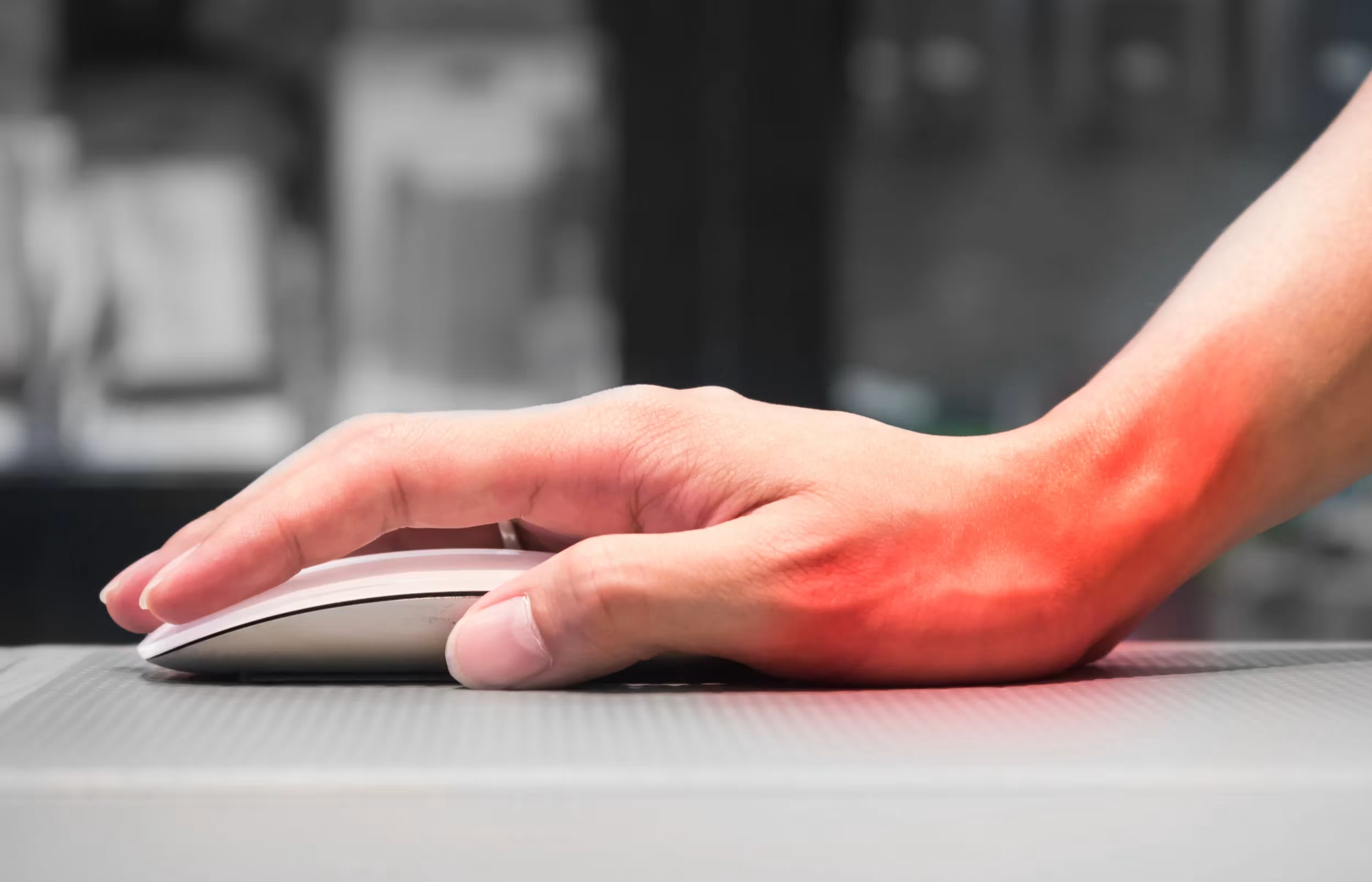
A standard mouse forces your arm out to the side, your wrist into a twisted grip, and your shoulder into a position it holds for hours. The RollerMouse Red Plus eliminates all three of those problems at once. For a broader overview, start with our guide to the best ergonomic mouse.
Instead of gripping a handheld device, you control the cursor using a wide, textured aluminum rollerbar positioned directly in front of your keyboard. You roll it forward and back, slide it left and right, no gripping, no reaching, no pronation of the forearm. Both hands share the bar equally, which makes it truly ambidextrous.
The unit itself measures 16.75 x 6.2 x 0.95 inches and weighs 2.5 lbs. That solid, stationary build is by design. It stays put while you work, which means your arms rest naturally in front of your body rather than extending out to one side.
A CDC-cited study evaluating pointing device designs found that different mouse types produce measurably different upper extremity postures and muscle activation levels, a key reason why device geometry, not just wrist rests, determines long-term comfort. The Red Plus was built with that posture reality in mind.
Start here: Place the Red Plus directly in front of your keyboard tonight and notice where your shoulders sit. That relaxed position is the baseline your body is trying to find.
Key Features Built Around Your Comfort
The Rollerbar: Precision Control Without the Reach
.avif)
The rollerbar is the core of this device, and it's patented for good reason. Dual sensors track both the roll and lateral slide of the bar simultaneously, translating those movements into smooth, accurate cursor control across your screen.
The surface is grooved and textured for tactile feedback, which means you always know where your fingers are without looking down. Pressing the bar itself triggers a left-click, removing the need for a separate button action. Users who've struggled with trackpads during drag-and-drop tasks will notice the difference immediately, the rollerbar holds position while you press, instead of slipping like a trackpad surface often does.
DPI runs up to 2800 across 10 adjustable speed settings, which means precise pixel-level work for designers and fast navigation across multi-monitor setups for developers. Try this: Set your DPI one step lower than you think you need, and give it 30 minutes. Most users find the slower speed reduces micro-tension in the fingers significantly.
Adjustability That Fits You
-1649-p.avif)
The Red Plus gives you on-device control over DPI, click force, button functions, and a freeze mode (which locks the cursor, useful during calls or presentations). No software install required for basic setup, which means it works immediately on any machine.
Wrist rest options are where the Plus naming earns its place. The included Plus rest is 5 inches of memory foam wrapped in vegan leather, providing palm-to-forearm support that the standard 3-inch rest cannot match. If you have larger hands or long forearms, this matters more than any spec sheet detail.
The RollerMouse Red Plus connects via 2.4GHz wireless dongle, Bluetooth, or USB-C wired, whichever your workflow demands, with up to 3 months of battery life per charge.
Who Should Use the RollerMouse Red Plus
This device is built for keyboard-heavy professionals who spend most of their workday typing, not mousing. Think software engineers, writers, accountants, and data analysts, people who switch between keyboard and mouse hundreds of times a day. Each switch is a small reaching movement. Multiplied by 300 or 400 repetitions, that's significant cumulative strain.
It's also a strong fit if you:
- Are recovering from or managing diagnosed RSI, tendinitis, or carpal tunnel
- Have larger hands that feel cramped on standard vertical mice
- Work ambidextrously or want to share mouse control between both hands
- Use audio production software like Pro Tools, where button customization speeds up common actions
- Experience shoulder or neck discomfort from reaching to the side repeatedly
A study on the RollerMouse Red found it can increase work efficiency by up to 19%, which means faster task completion alongside reduced physical strain.
The Red Plus is not ideal if you do heavy graphic design work that relies on fine, sustained cursor pressure, or if you primarily use a laptop away from a desk without a keyboard tray setup.
If you're a health and safety specialist sourcing solutions for a team, the RollerMouse Red Plus + Balance Keyboard, Wired bundle makes onboarding easier. For more on the shoulder side of this, read about what mouse shoulder is.
How It Stacks Up Against Other Ergonomic Mice
.avif)
Ergonomic mice fall into several categories: vertical mice, trackballs, trackpads, and centred rollerbar devices. The Red Plus sits in its own lane within that last category.
Versus vertical mice (like the Logitech MX Vertical): Vertical mice reduce forearm pronation, but they still require you to reach sideways and grip. The Red Plus eliminates lateral reach entirely.
Versus trackballs (like the Kensington Slimblade): Trackballs remove arm movement but still require sustained thumb or finger pressure on a ball. The rollerbar distributes control across the full hand width, reducing single-point pressure.
Versus trackpads: Trackpads lose on precision, especially for drag tasks. The grooved rollerbar holds its position under pressure in a way a flat glass surface cannot.
The Red Plus also brings eco-conscious materials into the comparison, and the antibacterial surface treatment is a hygiene advantage in shared office environments.
If you want deeper setup guidance, the RollerMouse Red Help Center covers driver configuration, button mapping, and connectivity troubleshooting in plain language.
Do this today: List the three biggest physical complaints from your current mouse setup, reach, grip, or wrist angle. The Red Plus directly addresses all three.
If you're not sure which ergonomic mouse to choose, our Help Me Choose Tool narrows it down and finds the mouse that fits you in under a minute.
Conclusion
The Contour RollerMouse Red Plus is one of the few ergonomic devices that addresses the root cause of mouse-related strain rather than just softening the symptoms. It repositions your hands, removes the grip, and brings control to the center of your desk. To understand the design behind it, learn about a mouse with a roller bar.
If wrist pain, shoulder tension, or RSI risk is a real concern in your daily work, this device deserves a serious look.
Frequently Asked Questions About the Contour RollerMouse Red Plus
What makes RollerMouse Red Plus different from a standard mouse?
The RollerMouse Red Plus positions a stationary rollerbar in front of your keyboard instead of requiring lateral reaching. This eliminates gripping, arm extension, and wrist twisting, core causes of mouse-related strain. A study on device ergonomics confirms that pointing device geometry directly affects upper extremity posture and muscle activation.
How does the rollerbar work compared to a trackpad or trackball?
The patented grooved rollerbar uses dual sensors to track rolling and lateral sliding simultaneously for smooth cursor control. Unlike trackpads, it holds position under pressure for drag-and-drop tasks. Unlike trackballs, it distributes control across your full hand width, reducing single-point strain on thumbs or fingers.
Is the Contour RollerMouse Red Plus suitable for people with RSI or carpal tunnel?
Yes. The device eliminates the repetitive reaching and gripping that aggravate RSI and carpal tunnel. It's designed for people recovering from or managing these conditions.
Can I adjust the DPI and button functions on the RollerMouse Red Plus?
Yes. The RollerMouse Red Plus offers on-device control for DPI (up to 2800), click force, button functions, and freeze mode, with no software required for core use.
What connectivity options does the RollerMouse Red Plus have?
The device connects via 2.4GHz wireless dongle, Bluetooth, or USB-C wired. Wireless mode delivers up to 3 months of battery life per charge.
Who should consider the RollerMouse Red Plus, and who should not?
It's ideal for keyboard-heavy professionals and people managing shoulder or wrist pain. It's less suitable for heavy graphic design work requiring sustained pen pressure, or laptop-only workflows without a stable desk setup.

Which Device Is Right for You?
Take a quick quiz and get a personalized recommendation based on how you work.

