
Contour Design RollerMouse Red: The Centered Mouse That Could Finally Relieve Your Wrist Pain
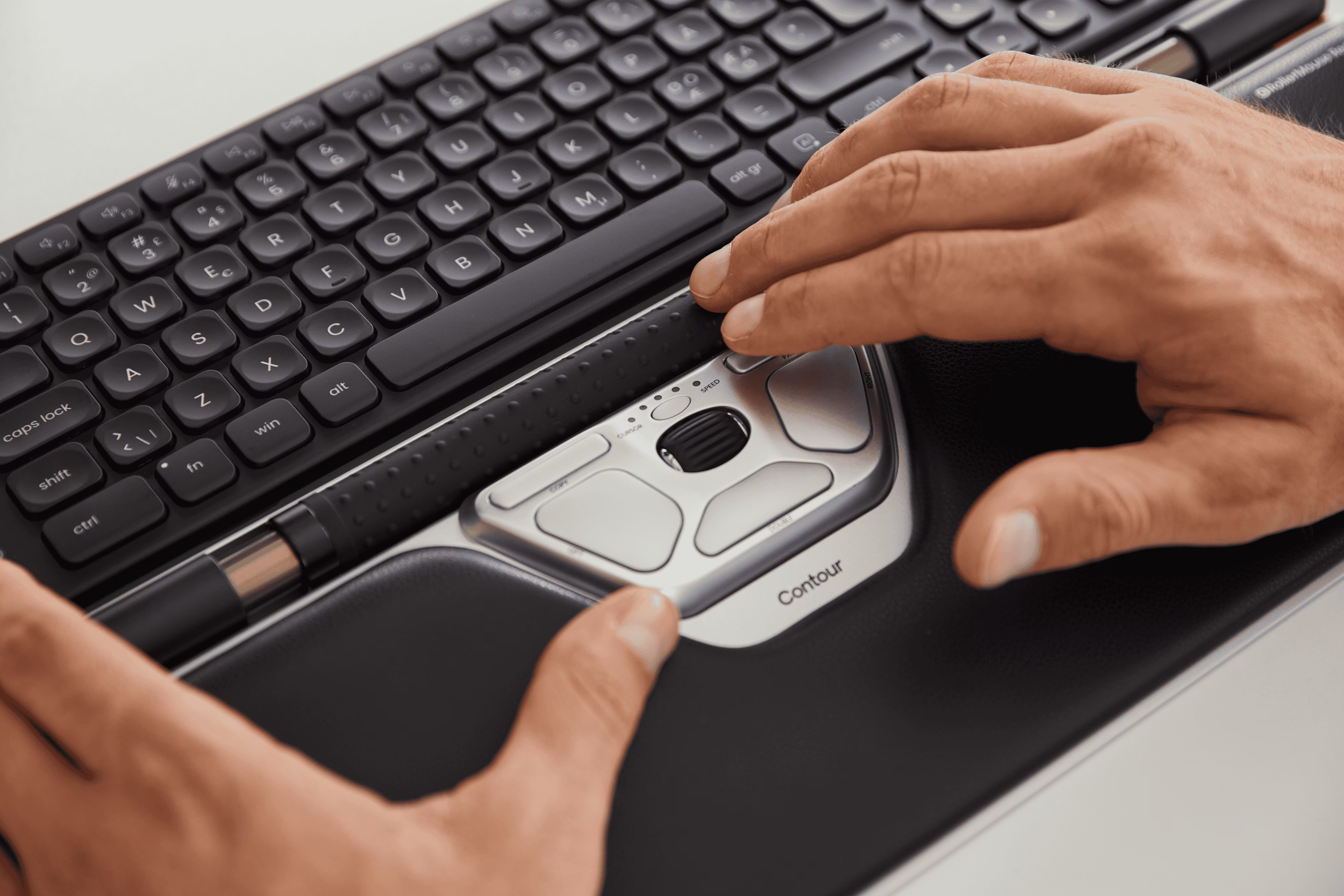
If you spend 6–10 hours a day at a keyboard, your wrist already knows something is wrong. The Contour Design RollerMouse Red is a centered pointing device that replaces your traditional mouse entirely, sitting in front of your keyboard where both hands can reach it without stretching, gripping, or twisting. It uses a patented rollerbar to move the cursor, which means your forearms stay relaxed and your shoulders stay neutral. This article breaks down exactly what makes it different, who it's genuinely built for, and what daily use actually feels like.
Key Takeaways
- The Contour Design RollerMouse Red eliminates lateral reach and grip strain by positioning a centered rollerbar in front of your keyboard, allowing both hands to access it naturally without stretching or twisting.
- The patented rollerbar mechanism with advanced tracking precision reduces forearm and shoulder muscle load compared to traditional mice, supported by CDC-funded research on pointing device ergonomics.
- Most users adapt to the RollerMouse Red within 30–60 minutes, experiencing intuitive ambidextrous control with maintained neutral wrist posture that aligns with CCOHS ergonomic guidelines.
- The RollerMouse Red is specifically designed for professionals working 6+ hours daily on keyboard-heavy tasks who experience wrist, forearm, or shoulder pain linked to repetitive mouse use.
- RollerMouse Red pairs seamlessly with ergonomic keyboards, making it a considered investment for professionals managing the repetitive strain of heavy mouse use.
- Gaming and large-gesture creative work require a traditional mouse, as the rollerbar doesn't match the speed and precision needed for fast-twitch tasks or wide cursor movements.
What Makes the RollerMouse Red Different From Every Mouse You've Tried
Most ergonomic mice still ask you to reach, grip, and hover. The RollerMouse Red doesn't. For a broader overview, start with our guide to the best ergonomic mouse.
It sits centered in front of your keyboard, not off to the side, so both hands move naturally to the rollerbar without any lateral reach. That single design decision changes everything about how your upper body loads during a workday.
The Rollerbar: A Fundamentally Different Mechanism

Instead of clicking and dragging with a gripped hand, you roll a smooth, textured bar with your fingers or thumbs. Left, right, forward, back, all directions are accessible with minimal effort. The bar features a frictionless glide and advanced tracking precision, which means cursor control feels responsive without requiring force.
A CDC-funded study on pointing device design found that device type directly affects upper extremity posture and muscle activity during mousing tasks. Devices that reduce lateral reach and grip reduce muscle load in the forearm and shoulder. The RollerMouse Red is engineered around exactly that principle.
What's Upgraded From Previous Models
The Red is a significant step forward from the Free2 and earlier RollerMouse generations:
- Thicker, textured rollerbar with improved tactile feedback
- Smoother click and scroll action with reduced resistance
- Better edge-detection without relying on side buttons
- Sturdier aluminum body that doesn't flex under pressure
- Memory foam wrist rest that cushions without restricting movement
Three variants exist: the standard Red, the RollerMouse Red Plus with a wider wrist rest and extra buttons, and the Red Max for larger hands. All three share the same core rollerbar mechanism.
Wired and Wireless Options
You can pair the RollerMouse Red with your existing keyboard or go all-in with a bundle. The RollerMouse Red + Balance Keyboard combo gives you a complete ergonomic workstation in one purchase.
Customizable cursor speed settings let you dial in sensitivity for your workflow, whether you're navigating spreadsheets or editing in Figma. The device works on Windows and Mac without complex software, drivers are available but optional.
If you travel frequently for work, the Travel Kit RollerMouse Red bundles the device with a Balance Keyboard, laptop stand, and universal sleeve for a portable ergonomic setup.
Start here: Compare the Red to your current mouse by measuring how far right your arm reaches to use it. That distance is daily strain you're absorbing.
Who the RollerMouse Red Is Built For — and How It Feels to Use Every Day
The RollerMouse Red is designed for people who depend on their computer for income and are starting to feel the physical cost of that dependency.
This device is a strong fit if you:
- Work 6+ hours daily on a keyboard-heavy task (coding, writing, design, data entry)
- Have wrist, forearm, shoulder, or neck pain linked to mouse use
- Have been diagnosed with RSI, carpal tunnel syndrome, or tendinitis
- Work with both hands frequently and want ambidextrous access
- Use a split or ergonomic keyboard and want a pointing device that fits between the halves
Work-related musculoskeletal disorders of the upper limb and neck are among the most common occupational health conditions in adults, with repetitive computer use listed as a primary driver. The RollerMouse Red directly addresses the repetitive grip-and-reach pattern that contributes to that load.
What the Adjustment Period Actually Looks Like
Honestly? The first 30 minutes feel strange. Your hand wants to reach for where the old mouse was.
Most users settle in within 30–60 minutes of active use and report that the movement becomes intuitive quickly. The rollerbar doesn't require fine motor precision, you roll with whichever fingers feel natural. After a few hours, you stop thinking about it. For more on the shoulder side of this, read about the best computer mouse for shoulder pain.
Neutral wrist posture is the default. You don't have to work to maintain it: the device enforces it by design. OSHA ergonomic keyboard guidelines recommend keeping wrists straight and elbows close to the body during computer use, the RollerMouse Red's centered placement supports both conditions simultaneously.
Pairing It With an Ergonomic Keyboard

The RollerMouse Red includes adapter feet for thinner keyboards, so it sits flush rather than creating an angle gap. It pairs especially well with split keyboards because you can center it between the two halves, keeping both hands symmetrical.
For a complete setup, the RollerMouse Red Plus + Balance Keyboard wired bundle gives you a matched pair designed to work together.
Honest Limitations to Know Before You Buy
The RollerMouse Red is not the right tool for every task:
- FPS gaming: Rollerbar movement doesn't match the speed or precision of a traditional mouse for fast-twitch gaming.
- Large-gesture creative work: Some designers who use wide, sweeping cursor movements report a learning curve for tasks like 3D navigation.
For professionals whose livelihood runs through their hands, the math shifts quickly. Missing a week of work to wrist pain costs far more than $374.
Try this today: Position your current mouse directly in front of your keyboard for one hour and notice the difference in shoulder tension. That's the posture the RollerMouse Red makes permanent.
If you're not sure which ergonomic mouse to choose, our Help Me Choose Tool narrows it down and finds the mouse that fits you in under a minute.
Conclusion
The Contour Design RollerMouse Red isn't a small upgrade. It's a rethink of how you interact with your computer.
If wrist or shoulder pain is affecting your work or your quality of life, this device addresses the root cause rather than masking symptoms. The centered design, ambidextrous access, and neutral wrist positioning work together to reduce the repetitive load that accumulates over years of conventional mouse use. If repetitive strain is the bigger worry, see our guide to the best ergonomic mouse for RSI.
For RSI-conscious professionals, it's one of the most substantiated ergonomic investments available today.
Frequently Asked Questions About the Contour Design RollerMouse Red
What is the Contour Design RollerMouse Red and how does it differ from a traditional mouse?
The RollerMouse Red is a centered, ambidextrous pointing device that sits in front of your keyboard instead of off to the side. It uses a patented rollerbar instead of gripping and reaching, allowing both hands to access it naturally without lateral stretch. This eliminates the repetitive strain pattern of traditional mouse use while maintaining neutral wrist posture.
How long does it take to adjust to using a RollerMouse Red?
Most users adjust within 30–60 minutes of active use. The first 30 minutes may feel unfamiliar as your hand habits shift, but the rollerbar movement becomes intuitive quickly. You don't need fine motor precision—just roll with whichever fingers feel natural, and neutral wrist posture is enforced by design.
Who should use the Contour Design RollerMouse Red?
The RollerMouse Red is ideal for professionals working 6+ hours daily on keyboard-heavy tasks who experience wrist, forearm, shoulder, or neck pain. It's especially suited for those with RSI, carpal tunnel syndrome, or tendinitis. Work-related upper limb and neck musculoskeletal disorders are among the most common occupational health conditions, and this device directly addresses the repetitive strain that causes them.
Can I use the RollerMouse Red with my ergonomic or split keyboard?
Yes. The RollerMouse Red includes adapter feet for thinner keyboards, so it sits flush without creating angle gaps. It pairs especially well with split keyboards because you can center it between the two halves, keeping both hands symmetrical. The RollerMouse Red Plus + Balance Keyboard bundles work perfectly as a matched ergonomic setup.
What are the main upgrades in the RollerMouse Red compared to earlier models?
The Red features a thicker, textured rollerbar with frictionless glide and advanced tracking precision; smoother click and scroll action with reduced resistance; better edge-detection without side buttons; a sturdier aluminum body; and a memory foam wrist rest. These upgrades deliver more responsive, effortless cursor control and improved comfort during extended use.
Is the RollerMouse Red suitable for gaming or creative design work?
The RollerMouse Red is less suited for FPS gaming, as the rollerbar doesn't match the speed and precision of a traditional mouse for fast-twitch gameplay. Some designers using wide, sweeping cursor movements report a learning curve for tasks like 3D navigation. It excels for spreadsheets, writing, coding, and general office work where precision and comfort matter more than speed.

Which Device Is Right for You?
Take a quick quiz and get a personalized recommendation based on how you work.

