
Computer Mouse Elbow Pain: Causes, Relief, And Ergonomic Fixes

Computer elbow is not a diagnosis anyone will write on a chart. It is a catch-all name for elbow pain that shows up after long hours at a desk, and it covers four problems that respond to different fixes. That distinction matters more than any stretch or gadget, because the treatment for an irritated tendon is close to the opposite of the treatment for a compressed nerve.
Elbow pain from mouse use is the version most people land on. You reach for the mouse, feel a sharp twinge on the outside of the elbow, and tell yourself it will settle. Then you open a jar that evening and the elbow bites back.
What Computer Elbow Actually Covers
Sorting which version you have takes about a minute and changes what you do first.
Mouse elbow is the common one at a desk. The tendon usually involved is the extensor carpi radialis brevis, one of the forearm muscles that drives wrist and finger extension, and it anchors at the lateral epicondyle on the outer elbow joint. According to AAOS OrthoInfo's guide to tennis elbow, the damage is degeneration and microtearing rather than simple inflammation. That changes the treatment. Anti-inflammatories quiet the pain but do not rebuild a tendon. Gradual loading does.
Golfer's elbow is the same story on the inner side, where the flexor tendons attach. Both are tendon injuries built from repetitive arm movements, and both can leave you with a weaker grip.
The nerve version behaves differently. AAOS notes that cubital tunnel symptoms appear more when the elbow is bent, which narrows the channel and restricts blood flow to the nerve, and that leaning on the inside of the elbow makes them worse. If that is your pattern, stretching the forearm will not help much. Keeping your elbow straighter for more of the day will.
If you are still not sure which version you have, our breakdown of computer elbow symptoms and what they mean goes through the signs one at a time.
Can Typing or Using a Mouse Cause Tennis Elbow?
Yes, though "cause" does more work than it should. Mouse elbow and tennis elbow are the same condition, and both come from repeated loading of the wrist extensor tendons. You work with the wrist extended, grip to keep the mouse steady, and repetitive clicking adds a few thousand small contractions a day. Overworking the forearm extensors and flexors this way produces muscle strain and fatigue as well as micro-tears in the tendon.
What makes desk work different from sport is the size and frequency of the load. A tennis serve is a big load a few hundred times. Mousing is a small load tens of thousands of times, with no recovery between. NIOSH lists repetition, sustained force, and awkward posture as the conditions that trigger work-related musculoskeletal disorders, and continuous computer work stacks all three.
So typing and mousing can bring it on, and they reliably sharpen it once it exists. What they rarely do is cause it alone. Grip force, reach distance, poor posture, and hours without a break all feed the same tendon. Our blog on tennis elbow as a repetitive strain injury goes deeper on why repetitive movements at a keyboard turn into lasting pain.
Why Elbow Pain from Mouse Use Happens
Three things drive elbow load at a computer, and they compound.
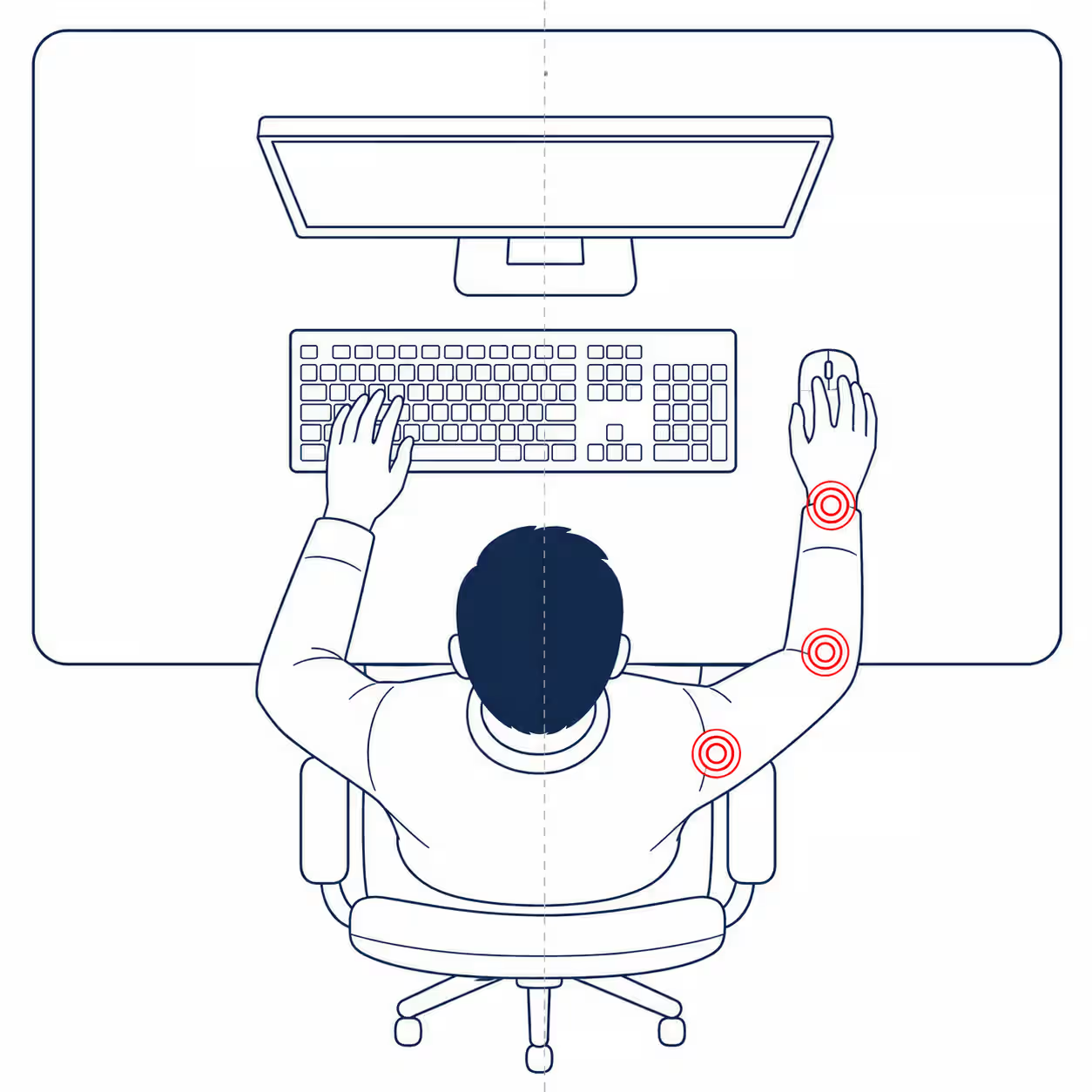
Mouse reach is the big one, and it is why elbow pain from mouse use is more common than pain from typing alone. Mouse placement matters more than the model. A traditional mouse parked to the side of the keyboard adds roughly 6 to 8 inches of sideways reach every time you move from typing to pointing. That switch swings your shoulder out, drives forearm pronation as the palm turns down, and pushes your wrist sideways. The elbow absorbs the torque at the end of that chain.
Grip force is the quiet one. Most people hold a mouse harder than the task needs, and that constant tension can restrict blood flow through the forearm muscles rather than letting them work rhythmically. Low sensitivity settings make it worse, because you drag further for the same cursor distance.
Contact pressure is the one nobody notices. Resting the inside of your elbow on a hard desk edge presses directly on the ulnar nerve where it has the least padding. This is the most common reason for ring and little finger tingling at a desk, and the easiest thing here to fix.
Worth checking today:
- A desk too high or chair too low, so your elbows hang unsupported and the wrists cock up
- A wide keyboard that pushes the mouse out past your shoulder line
- A hard desk edge, or a wrist rest set too high so it bends the wrist back
Two Checks You Can Run at Your Desk
Neither is a diagnosis. Together they narrow the field in under two minutes.
The resisted extension check. Straighten your arm, make a loose fist, and bend your wrist back while pressing gently on the back of that hand. Outer elbow pain points toward lateral epicondylitis, and reversing it into wrist flexion tests the inner side. Stop if the pain is sharp.
The elbow bend check. Hold your elbow fully bent, hand near your shoulder, for 60 seconds. Tingling in the ring and little fingers supports ulnar nerve irritation rather than a tendon problem. If it appears, sleeping with the elbow straight, or loosely wrapped so it cannot fully bend, is worth trying.
If you get numbness at rest, skip self-management and book an appointment.
Relief in the First Two Weeks
Start by removing load, not by adding exercise. A tendon irritated eight hours a day will not respond to ten minutes of stretching.
- Break for five minutes away from the mouse every 30 to 45 minutes
- Use a lighter grip so the hand rests on the mouse rather than clutching it
- Raise pointer speed so smaller movements cover the same screen distance
- Move from the elbow and shoulder for large cursor travel, not from the wrist
- Switch hands for low-precision work such as scrolling or browsing
- Roll shoulders back and down every hour to keep the shoulder blades set
Most people notice a difference within a few days of making these ergonomic changes alone. If reducing load changes nothing, the problem may not be mechanical.
An ice pack held on the outer elbow for 10 to 15 minutes can soothe soreness after a long work session, and gentle heat before work helps morning stiffness. Neither speeds the healing process, so treat both as comfort measures. Over-the-counter anti-inflammatories help reduce pain short term, but check with your clinician first if you have stomach, kidney, or heart conditions. A counterforce strap worn just below the elbow lowers tendon load during activity, and our guide to choosing a computer elbow brace and support covers fit and when one is worth wearing.
Use pain to set the dose. Pain at or below 3 out of 10 during an activity, settling within two hours, means you can continue. Pain that climbs past that, or stays high the next morning, means you did too much. Sharp pain, or pain with numbness, means stop and get it looked at.
If you want the longer version of this sequence, week by week, our practical plan for treating computer elbow sets out what to change and in what order.
Mouse Elbow Exercises, and When to Start Them
Start with gentle mobility while pain is high, then load the tendon once resting pain has settled. Three to four sessions a week beats daily, because tendons adapt during the rest.
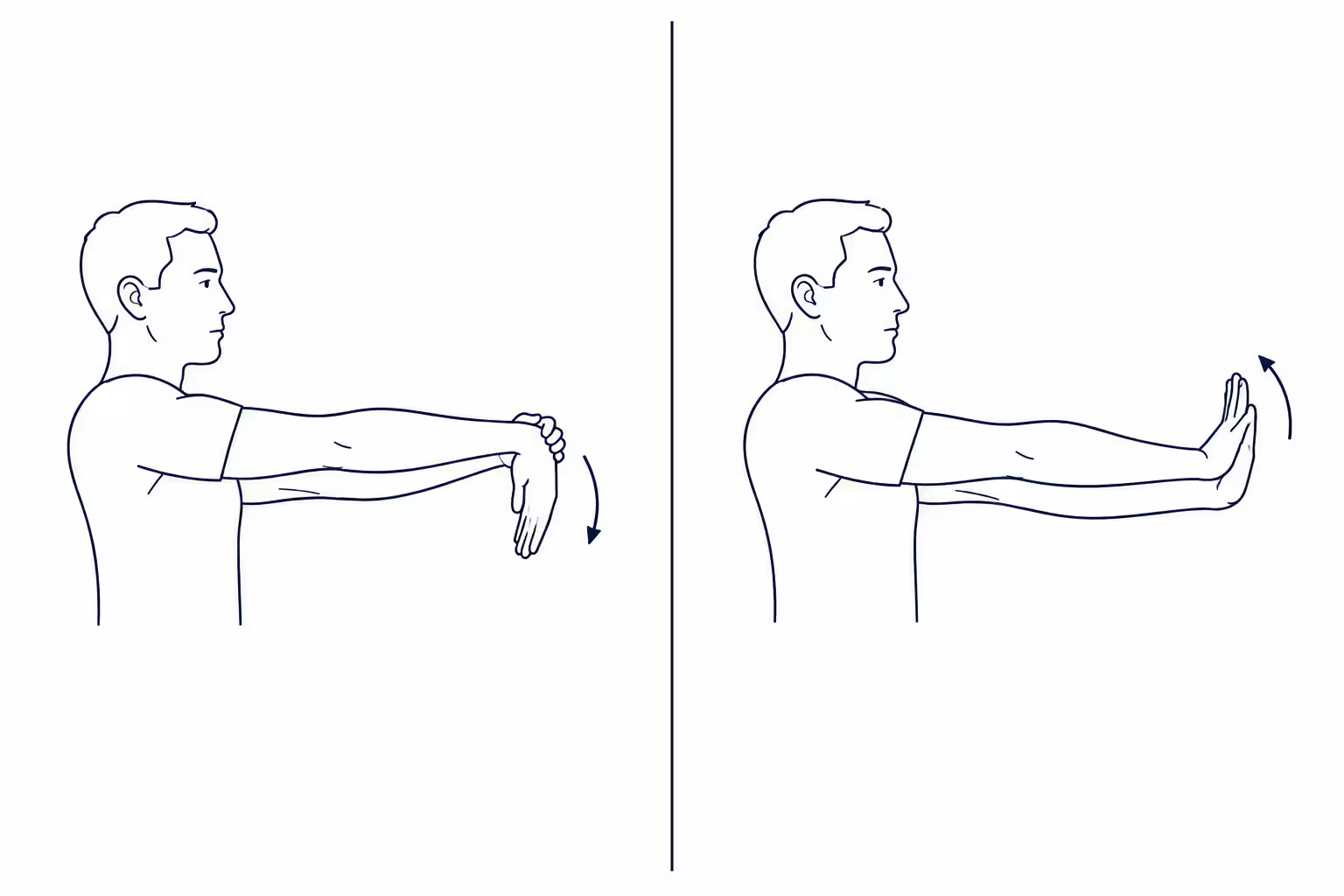
Wrist extensor stretch. Straighten your arm, palm down, and gently bend the wrist downward with your other hand until you feel a pull along the top of the forearm. Hold 20 to 30 seconds, twice, and repeat every couple of hours through the workday.
Wrist flexor stretch. Same position, palm up, bending the wrist downward until you feel the pull underneath. Hold 20 to 30 seconds, twice.
Tendon glides. Open the hand flat, then move through a hook fist, full fist, and straight fist, five cycles. These keep the finger extension and flexion range moving without loading anything.
Forearm pronation and supination. With your elbow tucked at your side and bent to 90 degrees, turn your palm up and then down slowly, 10 to 15 times. This reduces stiffness through the rotation the mouse demands all day.
Eccentric wrist extension. Rest your forearm on the desk, palm down, wrist over the edge, holding one to three pounds. Lift the working hand into extension with your other hand, then lower it slowly over three to four seconds under its own power. Three sets of 10 to 15, three to four days a week. The slow lowering is what improves tendon resilience.
Isometric holds for bad days. Push the back of your hand gently against your other palm and hold 20 seconds without moving, five times. These relieve pain without loading a tendon that is already unhappy.
For the full progression, including how to advance the loading once these feel easy, work from our computer elbow exercise routine.
Ergonomic Fixes for the Setup That Caused It
Most people who get past computer elbow do it in this order. Reduce the load, change the ergonomic setup, then rebuild capacity. The middle step is the one people skip.
The target position is simple. Keep the elbow at a 90 to 100 degree angle with the wrist neutral and the shoulders relaxed, the desk or keyboard tray at or just below elbow height, and the forearms supported on the chair arms or desk surface rather than a hard front edge. Set the top of the screen near eye level so your gaze drops 15 to 20 degrees to the middle of it. A quick test: close your eyes, relax your shoulders, then open them. If your shoulders lift or your wrists angle up when your hands return to the keyboard, one of the heights is wrong. If your chair has no usable arms, our roundup of elbow support for a desk setup covers what works instead.
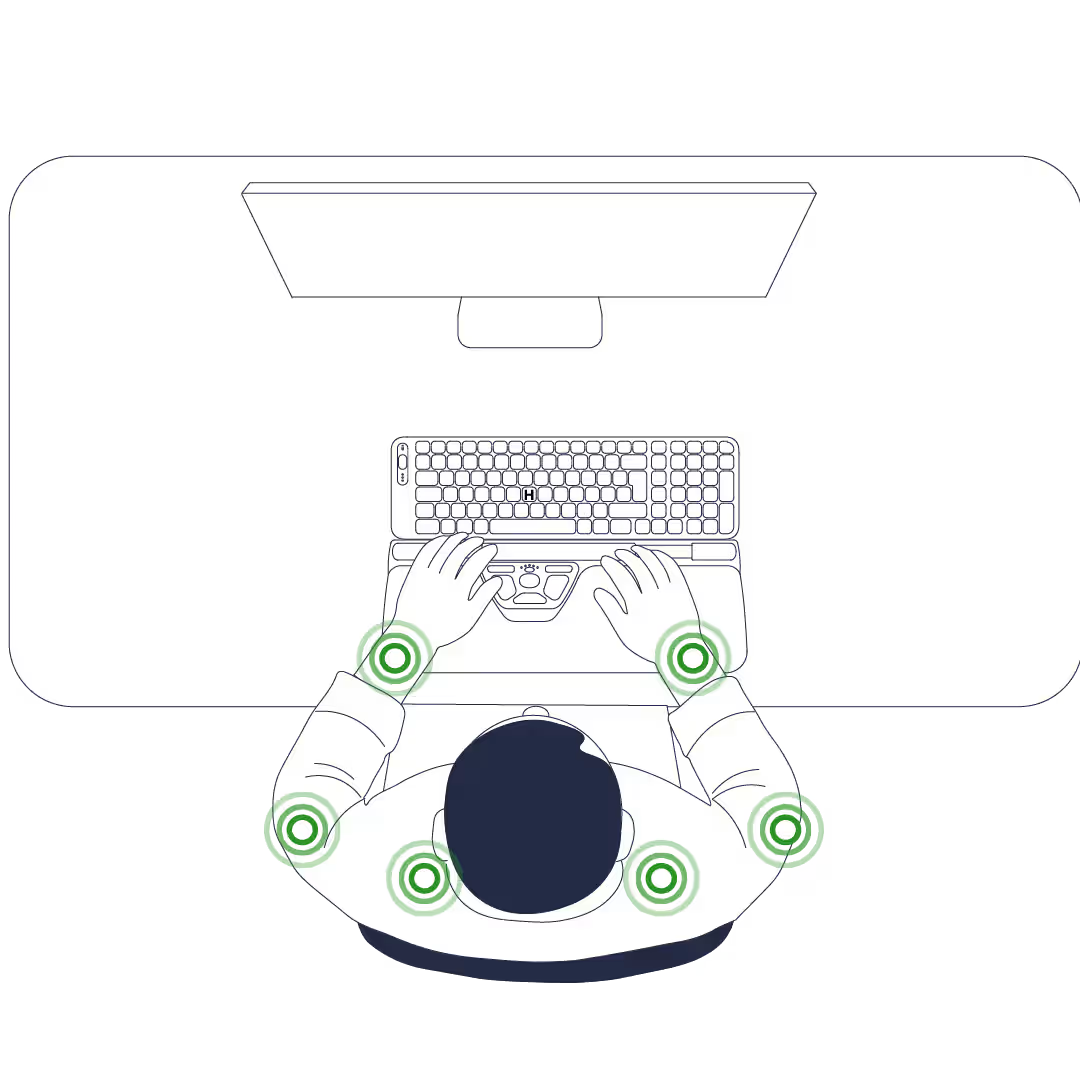
Then shorten the reach. Bringing the mouse closer, immediately beside the keyboard with no gap, is the highest-value change you can make, and a compact keyboard closes the distance further. That is why the Contour Design Balance Keyboard sits flush against a centered device.
Device choice follows your symptoms rather than reviews. Centered pointing devices such as a RollerMouse remove the sideways reach and hold both hands in a neutral wrist position, which suits pain that has spread to the shoulder, or a day with six or more hours of mouse time. Adjustable mice such as the UniMouse set any angle between 35 and 70 degrees to cut pronation and extensor tension, which suits wrist and forearm symptoms. A trackball mouse cuts arm travel too, though it loads the thumb, which suits some people and not others. Our roundup of mouse options for tennis elbow compares them properly.
No device treats a tendon. Whatever ergonomic tools you pick, the ergonomic adjustments that matter most are free. Shorten the reach, lighten the grip, stop more often.
Get Your Setup Assessed
You sit at this desk every day, which is why the reach loading your tendons looks normal to you. An assessment is the outside opinion. Our free workplace ergonomic assessment takes four minutes and covers seven areas, from your chair and monitor to your mouse setup and the symptoms you already have. You get back a report showing where your risk sits and what to adjust first. Nothing to buy, and no need to know what is wrong before you start.
Raising it at work lands better when the ask is specific. "My mouse position is aggravating my elbow and I would like my desk assessed" gives a manager something to act on.
How Long It Takes, and When to Escalate
Mild cases caught early often settle in two to six weeks once the load comes down. More established cases run six to twelve weeks, and a tendon irritated for a year can take longer. Most of this resolves without surgery. AAOS puts the success rate of nonsurgical treatment for tennis elbow at roughly 80 to 95 percent.
Book an appointment now if you have numbness or tingling present at rest, weakness that is getting worse, visible swelling, or pain that wakes you at night. Those are nerve and structural signals rather than tendon irritation.
If pain persists after six weeks of managed load and progressive loading, escalate. Physical therapy can tailor the progression, and a clinician can rule out nerve involvement and discuss a corticosteroid injection, shockwave therapy, or platelet-rich plasma. The evidence for those varies, and none removes the need to change what your hands do all day. Left alone for months, mouse elbow pain can settle into chronic pain that takes longer to shift, which is the main argument for acting early.
Where to Start This Week
Of all the ergonomic tips here, pick the one that removes the most load for the least effort. For most people that is closing the gap between the keyboard and the mouse, then loosening the grip. Give it two weeks before you judge it. If the pain drops even slightly, you have found the change that matters, and the rest is doing more of it.
Frequently Asked Questions
Is Computer Elbow the Same as Tennis Elbow?
In most cases yes. Computer elbow, mouse elbow, and tennis elbow describe the same tendon problem at the outer elbow, and the only real difference is what caused it. Tennis produces it with a few hundred heavy loads. Mousing produces it with tens of thousands of small ones. The distinction matters for prevention, since fixing a desk setup is a different job from fixing a backhand, but the tendon and the treatment are the same.
How Is Computer Elbow Treated?
In three stages, in this order. Cut the load first, by shortening the mouse reach, loosening the grip, and breaking every 30 to 45 minutes. Fix the setup second, so the load does not come straight back. Rebuild tendon capacity third, with slow eccentric wrist extension three to four days a week. Most people skip the middle stage and wonder why the pain returns. Our practical plan for treating computer elbow sets out the full sequence.
Do Elbow Braces or Straps Help?
A counterforce strap worn just below the elbow reduces the pull on the tendon during activity and gives many people short-term relief while working. It does not treat the underlying tendon change, so use it alongside load management rather than instead of it. Stop if it increases numbness. Our guide to choosing a computer elbow brace covers fit and when one is worth wearing.
How Long Does Computer Elbow Take to Heal?
Mild cases caught early often settle in two to six weeks once the load drops. More established cases usually take six to twelve weeks, and long-standing pain can take longer. Resume full activity when daily tasks are comfortable and symptoms do not spike the following morning.

Which Device Is Right for You?
Take a quick quiz and get a personalized recommendation based on how you work.

