
Best Mouse For Ulnar Nerve Pain: 7 Ergonomic Picks For Ergonomic Benefits

The best mouse for ulnar nerve pain is the one that stops your wrist bending sideways and your arm reaching all day. Review counts will not tell you which one that is. If you feel tingling in your ring and little fingers by mid-afternoon, or a burn running up the ulnar side of your forearm, the shape and the position of your mouse are part of the pattern you are living in.
Two clinical names come up, and they are not the same thing. Cubital tunnel syndrome is ulnar nerve compression at the inside of the elbow. Guyon's canal syndrome is compression at the wrist, and it is rare.
Cleveland Clinic lists numbness and tingling in the pinky and ring fingers as the most common symptom either way, along with hand weakness that makes buttoning a shirt awkward. Both sit under ulnar nerve entrapment, which our overview guide covers end to end.
What follows is the device side, aimed at wrist pain, hand pain, and finger and pinky symptoms rather than the elbow. Contour Design® has spent three decades building centered and vertical input devices, so a few of these are ours, and we will tell you where they are the wrong answer.
Why mousing irritates the ulnar nerve
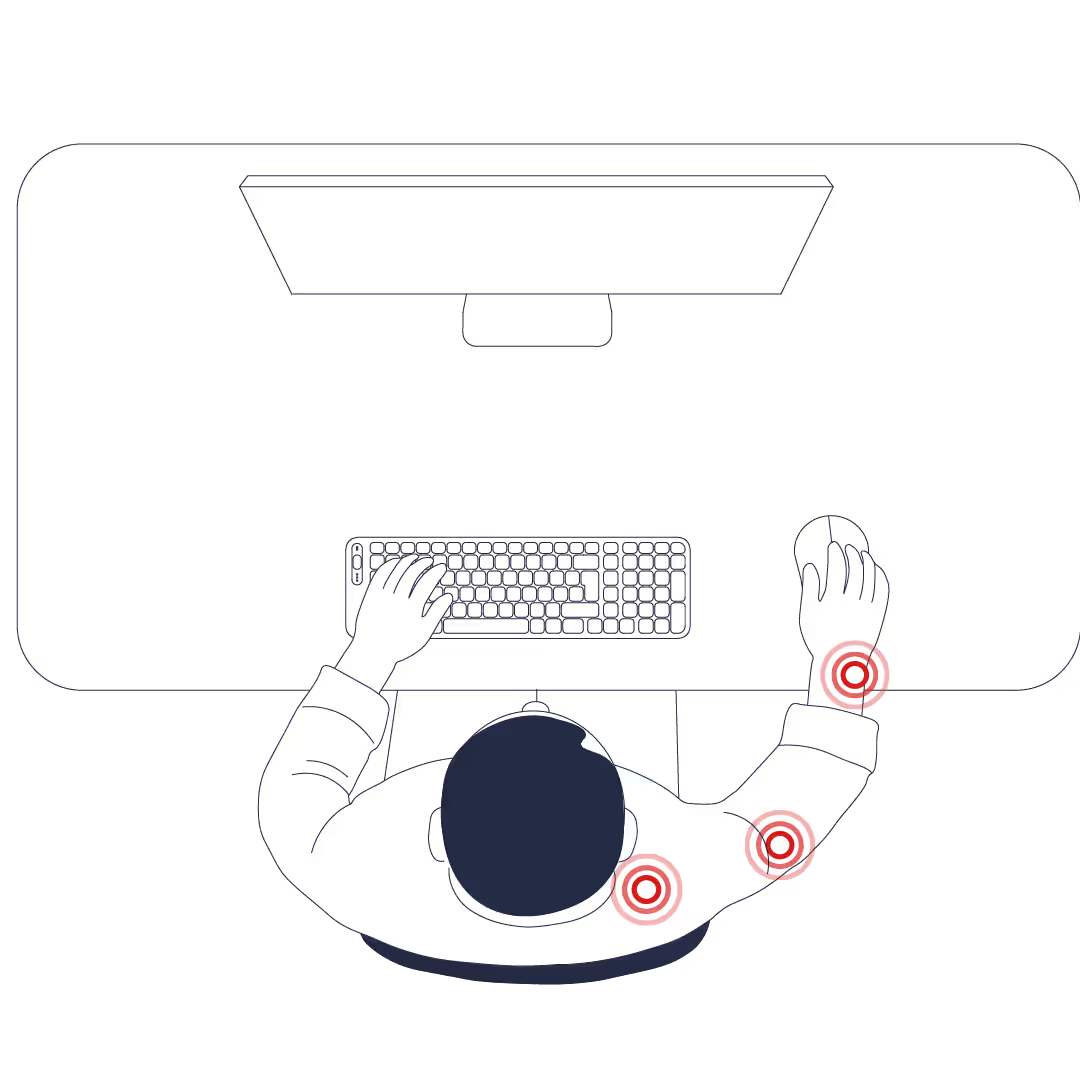
Four loads do most of the damage. Ulnar deviation, forearm pronation, hard contact at the ulnar palm, and grip and click force. A traditional computer mouse on a full-size keyboard stacks all four at once.
The anatomy
The ulnar nerve runs from the neck, behind the inner elbow through the cubital tunnel, down the ulnar forearm, and into the hand through Guyon's canal at the heel of the palm, where it serves the little finger and half the ring finger. StatPearls' anatomy reference names prolonged elbow flexion and prolonged compression while typing at a desk among the ways that path gets squeezed.
How a traditional mouse builds the load
Your setup builds a chain, one link at a time.
- The mouse sits past the number pad, so the arm travels sideways to reach it.
- The wrist bends toward the pinky to keep the hand on the shell, which is ulnar deviation.
- The forearm rotates palm-down to sit flat, which is pronation.
- The heel of the palm parks on the desk, directly over the tunnel the nerve uses to enter the hand.
Hard contact at the ulnar palm is the one people miss. Press that part of your hand against a desk edge for hours, especially with the wrist extended and deviated, and it can aggravate symptoms on its own.
Why grip force makes all of it worse
A heavy click means a sustained pinch, and a pinched hand holds every one of those angles more rigidly. Repeated movements at high grip force are what turn a bad angle into an ache by 4 p.m.
Reaching forward also keeps the elbow bent past 90 degrees for hours, which narrows the cubital tunnel. Cleveland Clinic is blunt about that, telling readers to avoid resting their elbows on a desk or chair arm during computer work.
None of this means your mouse gave you a nerve problem. It means the angles are aggravating one, and angles are changeable.
What to look for in a mouse for ulnar nerve pain
Four things separate a mouse that eases wrist strain from one that just looks ergonomic.
- A shorter reach matters most. A side mouse on a full keyboard pulls the arm roughly 12 to 18 inches sideways per cursor trip, and less movement means less shoulder work and less wrist bend.
- Deviation and pronation both drop when the hand sits closer to a handshake posture than to flat, with the wrists neutral and in line with the forearms.
- Low click force lets you rest a hand on a device instead of clamping it all day.
- Support belongs under the forearm or the broad center of the palm, never on a narrow ledge under the ulnar edge of your hand.
A device that wins on three of these and fails on the fourth is common. Vertical mice in particular can lower pronation while quietly adding reach, which is why they get their own scorecard further down.
Seven categories are worth considering for ulnar nerve issues, and they are not interchangeable.
1. Centered rollerbar mouse
Why it helps ulnar nerve pain
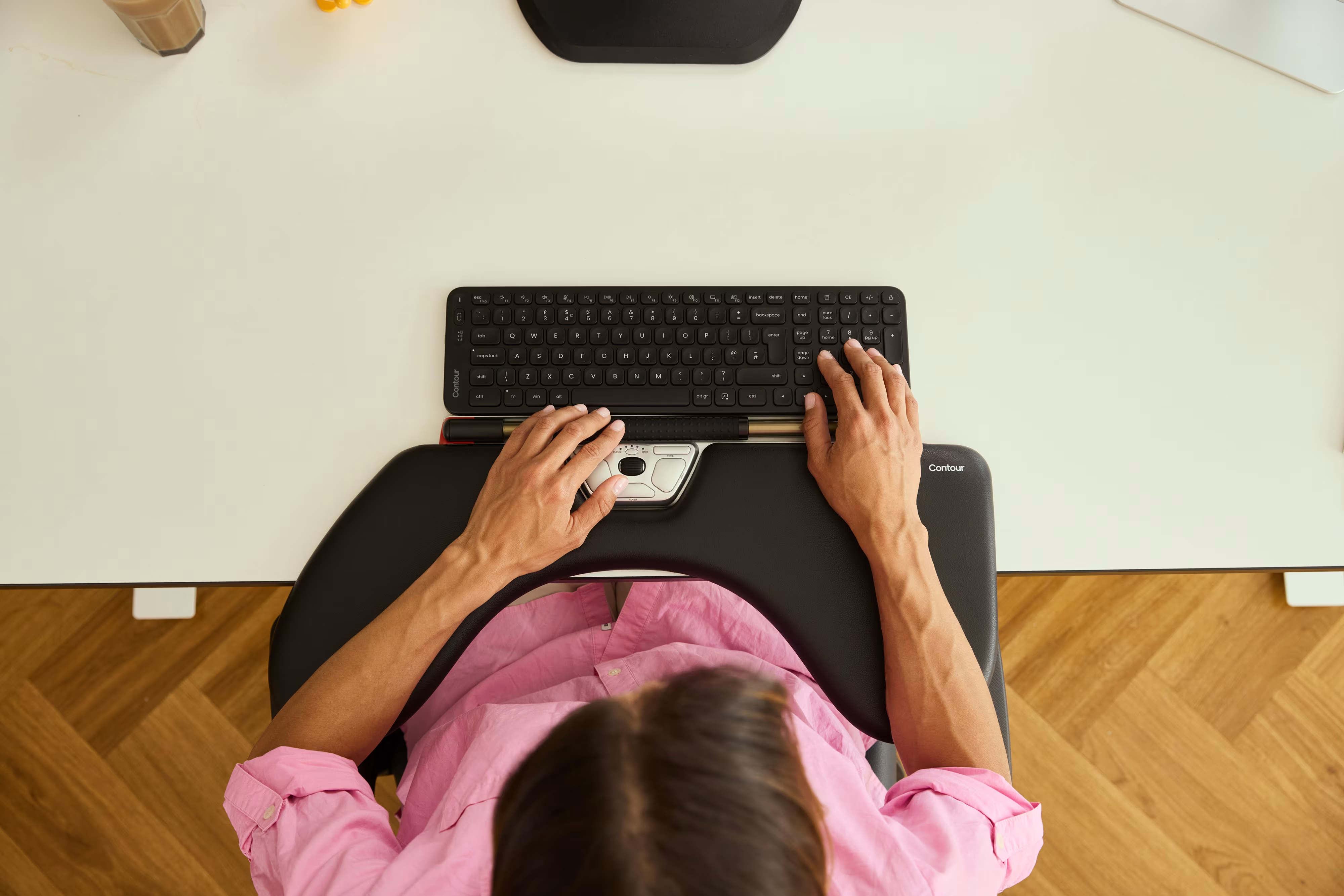
A centered rollerbar sits in front of the keyboard, below the spacebar, so pointing and clicking happen where your hands already rest. There is no sideways trip at all, and centered control keeps both shoulders level rather than one arm abducted for eight hours.
The measurements back it up. In a study of four pointing devices published in Applied Ergonomics by researchers at Harvard and Northeastern, looking at the musculoskeletal disorders linked to mouse use, the centrally placed rollerbar produced the most neutral hand and wrist posture and the lowest forearm extensor activity of the group.
- Wrist deviation measured about 6 degrees on the rollerbar against 9 degrees on a regular mouse.
- Shoulder abduction roughly halved, from 14 degrees down to 7.
- The rollerbar was no harder to use than the other devices, despite being unfamiliar to every participant.
Contour part-funded that work, and a 2014 University of Siegen study found no meaningful muscle-activity difference, though many users in it still preferred the rollerbar. Treat the posture finding as well supported and the muscle-load finding as contested.
Best for
- Wrist pain that has spread into the forearm, shoulder, or neck.
- Heavy daily computer use, roughly six hours or more, where repeated movements accumulate.
- Anyone who can feel pain ramp up when the mouse sits to one side.
- Office workers who want one device either hand can drive, so the load shifts when one side is sore.
The Contour RollerMouse family works this way, using a roller bar for low-force cursor control rather than a shell you grip and drag. It is not the first choice for sub-pixel design work. Point that work at the handheld UniMouse.
Setup tips
- Line the device up with your belly button so the roller bar sits under your resting fingers.
- Keep elbows at 90 to 100 degrees with forearms resting on the desk surface.
- Pair it with a low-profile Balance Keyboard so the keys stay close and the reach stays short.
2. Adjustable vertical mouse
Why it helps ulnar nerve pain
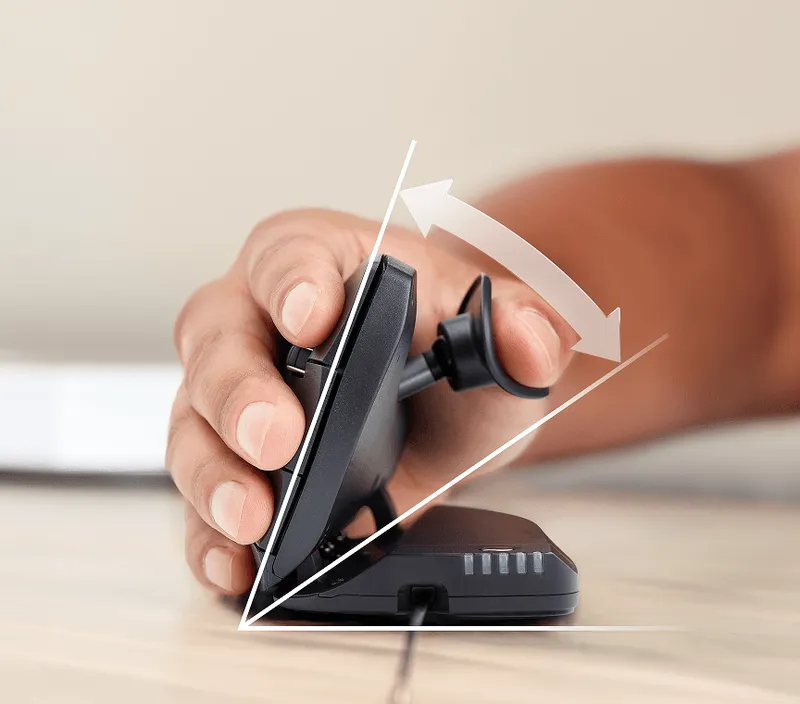
An adjustable vertical mouse rotates your hand toward a handshake position and lets you choose how far. Lowering pronation is the main mechanism, and an adjustable hinge means you set the angle your forearm wants instead of accepting the one a fixed shell chose for you.
The Contour UniMouse sets any angle between 35 and 70 degrees on a friction hinge, with no locked positions, and its sliding thumb support pivots to match your hand size rather than the average hand. A left-handed version exists as its own shape, not a mirrored right-handed shell.
Best for
- Wrist pain, forearm pain, and hand or finger symptoms, where the palm-down twist is the obvious problem.
- Anyone who wants to change angle and grip through long sessions rather than hold one static position.
- Left-handed users, and anyone sharing a workstation with a different hand size.
- Precision and creative work, because a handheld mouse gives the best fingertip pointer control.
Fit and adjustment tips
- Set the tilt mid-range first. Fully vertical often forces wrist extension, and flat defeats the point.
- Adjust the thumb support so the thumb rests on it rather than hovering above it.
- Use a high-precision DPI setting so small hand movements cross the screen and arm movement stays minimal.
- Map your most repeated clicks to the lightest buttons to reduce strain from click force.
3. Fixed-angle vertical mouse
Why it helps ulnar nerve pain
A fixed-angle vertical mouse holds one tilt permanently, which prevents the palm-down twist and reduces ulnar deviation for as long as the angle suits your hand. Fewer moving parts and a lower price make it a reasonable way to test whether vertical posture helps you before committing.
Best for
- A first trial of vertical posture, before spending on an adjustable model.
- A second workstation, or a home setup used a few hours a week.
- Smaller hands, which often fit compact vertical shells better than full-size ones.

What to check before you buy
Check how the mouse fits your hand before you check anything else.
- Your palm should rest on the body without stretching, and your fingers should drape over the buttons rather than reach for them.
- The thumb groove should guide the thumb without pulling the wrist inward.
- Look for an extended pinky lip or flange along the lower edge. It stops the pinky dragging against the desk surface, a direct source of ulnar irritation.
- Test button resistance. Heavy switches undo most of what the angle gains you.
Move up to an adjustable model if the fixed angle is nearly right but not quite.
4. Trackball mouse
Why it helps, and where it does not
A trackball mouse keeps the hand parked while the fingers or thumb move the cursor, which minimizes arm movement almost entirely. On a tight desk, or when your shoulder is the loudest complaint, that appeal is real.
The limits are real too. In the four-device Applied Ergonomics comparison, the trackball recorded the highest forearm extensor activity and the greatest wrist deviation of any device tested, and participants rated it and the touchpad the hardest to use. Holding a trackball still with some fingers while others move the ball keeps the hand splayed and working. Less arm movement does not automatically mean less strain.

Best for
- Very tight desk space, where a mouse has nowhere to travel.
- Shoulder-dominant discomfort rather than wrist-dominant discomfort.
- Short bursts of navigation alternated with another device, rather than long sessions.
Setup tips
- Favor a finger-operated design when the ulnar side of your hand is the sore part, since the thumb version concentrates all the motion in the thumb.
- Keep the device close to your body and the wrist supported and neutral, not pressed into the desk.
- Drop pointer speed for the first day or two while you recalibrate.
- Clean the ball weekly, so friction stays low and the force you apply stays low with it.
5. Pen-style mouse or stylus tablet
Why it helps ulnar nerve pain
A pen grip stacks the wrist the way handwriting does, which reduces both ulnar deviation and pronation. Pressure gestures also replace some clicks with light taps, so less pressure passes through the hand overall.
Best for
- Illustrators, retouchers, and anyone who already sketches or annotates daily.
- Vertical movement and drawing tasks, where a pen path beats a cursor drag.
- Alternating with a second device, which spreads load across different tissues.
Setup tips
- Keep a relaxed tripod grip. If your knuckles whiten, you are gripping too hard.
- Rest the forearm on the desk and keep the ulnar edge of your hand off hard surfaces.
- Set tap pressure and double-tap speed low to keep input pressure low.
- Put the pen down during reading and meetings so the grip is not continuous.
6. Centered touchpad
Why it helps ulnar nerve pain
A centered touchpad removes the sideways reach the same way a rollerbar does, and swaps the bar for finger gestures on glass. Taps and two-finger scrolls take very little force, so the hand stays loose and pressure low.
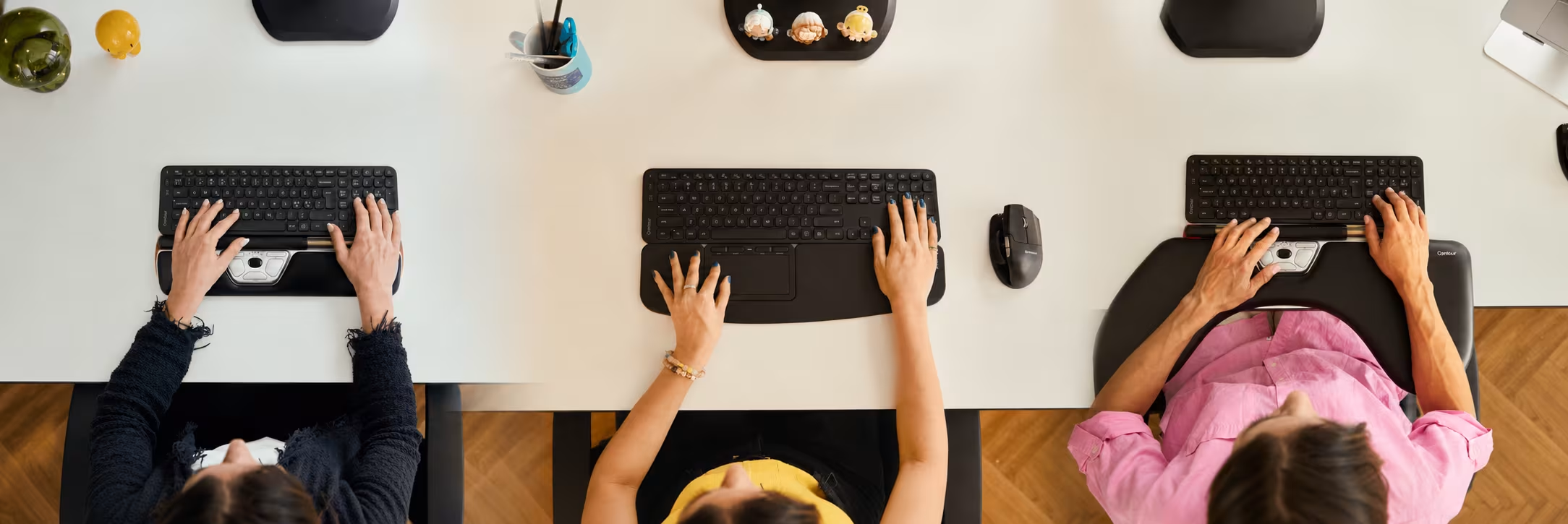
The posture data supports the placement. In that same four-device study, the centrally located touchpad produced the least wrist deviation of all, about 1 degree, because there is no device body to hold. Contour Touch works this way, with an integrated wrist rest so typing and pointing share one support surface.
.avif)
Best for
- Documents, email, browsing, and light spreadsheet work.
- People already fluent in laptop trackpad or tablet gestures.
- Shoulder relief for anyone who wants centered control but dislikes a bar.
Setup tips
- Place it directly in front of the spacebar so the reach from the home row is a couple of centimeters.
- Turn on tap-to-click and switch off hard-press clicks if pressing triggers symptoms.
- Raise pointer sensitivity so a short swipe crosses the screen.
- Rest the heel of the hand on the wrist rest, not on bare desk.
7. Compact and ambidextrous mice
Why it helps ulnar nerve pain
Two things make a compact device useful. It sits closer to the keyboard, which shortens the reach, and a genuinely ambidextrous shape lets you switch hands to give an irritated side a rest.
Best for
- Clearly one-sided symptoms, where the other arm can take some of the work.
- Laptop and travel setups, where a full centered device will not fit.
Setup tips
- Size down slightly so the device tucks against the keyboard edge and your shoulder stays down.
- Start the new hand on navigation and browsing, keeping precision work on your dominant side until coordination catches up.
- Mirror your layout on both sides, same spacing and same height, so you are not building a fresh problem on the other arm.
- Add a palm support so the hand rests on padding rather than the desk.
Does a vertical mouse actually help the ulnar nerve pain?
Yes for pronation, less reliably for the sideways wrist bend, and only if the device stays close to your body.
Where it reduces strain
The clearest evidence comes from Quemelo and Vieira, writing in Ergonomics in 2013. Measuring 16 people on a vertical mouse against a standard one, they recorded forearm pronation of 28 degrees versus 42, and wrist extensor activity of 13 percent of maximum versus 16. A 14 degree reduction in forearm twist takes measurable load off the extensors.
Two details from the same study complicate the picture. The vertical mouse put the wrist into about 5 degrees of ulnar deviation, while the standard mouse sat in 7 degrees of radial deviation, so the vertical shape did not reduce the sideways bend in that setup. Time to hit a target also rose from 3.4 to 4.2 seconds. That is the adaptation cost, measured.
A 2022 comparison of ten input devices in Revista Española de Patología adds a second caution. It found the vertical mouse required slightly more overall muscle activity than a traditional mouse, at 205 percent of resting level against 191 percent, with a centered rollerbar lowest at 139 percent. The sample was six participants, so read it as a caution rather than a verdict.
Where it backfires
- Too tall for your hand and you add wrist extension to reach the buttons.
- Placed far to the side and the elbow stays bent while the shoulder reaches, which is worse for the nerve than the pronation you fixed.
- Still gripping hard and the same load arrives in a new shape.
Wrist and hand pain with an obvious palm-down twist on your current mouse makes a vertical mouse a sensible first experiment. Pain that has already reached the shoulder or neck points elsewhere, because reach is the driver and a centered device removes it.
The seven options compared for wrist, hand, and elbow pain
All seven in one view, in the same order as the sections above, with the catch for each one.
If you read nothing else, start with option 2 when your symptoms sit in the wrist, hand, or fingers, and move to option 1 when the pain has spread past the wrist or you mouse more than six hours a day. Those two cover most desk workers.
Is your pain at the inner elbow rather than the wrist? Then none of the seven is quite the right starting point, because elbow flexion and desk-edge pressure drive that pattern rather than wrist angle. Our roundup of the best mouse for cubital tunnel syndrome covers elbow angle, armrest position, and the device choices that matter there.
Daily habits that protect the ulnar nerve
A better mouse lowers the load. Three habits stop you undoing it during long sessions.
- Break every 20 to 30 minutes to straighten both elbows and let your arms hang.
- Avoid resting the inner elbow on chair arms, desk edges, and car window ledges.
- Keep the elbow open at night, since sleeping with it tightly bent is a known aggravator.
Our ulnar nerve entrapment exercises cover the glides and stretches in full, including which ones to run past a clinician first.
Frequently asked questions
What is the best mouse for ulnar nerve pain if my symptoms are in my wrist and hand?
An adjustable vertical mouse is the first device to try. It rotates the forearm out of a flat, palm-down position, which reduces one of the loads on the forearm, and an adjustable model lets you find your own angle instead of accepting a fixed one. Keep the mouse close to the keyboard so you are not trading pronation for reach.
What mouse is best for wrist pain generally?
Route the choice by where the pain sits and what makes it worse, because "wrist pain" covers at least three different problems. Pain on the little-finger side, with tingling into the ring and little fingers, points to ulnar involvement — an adjustable vertical mouse or a centered device is the first thing to change. Pain on the thumb side that flares when you grip or lift points toward tendon irritation, where thumb-operated devices are the ones to avoid. Numbness in the thumb, index and middle fingers, worst at night, points to the median nerve and carpal tunnel. All three improve from the same two changes — move the device close enough that you are not reaching for it, and stop bracing your wrist on the desk — but the device choice differs, so work out which pattern you have first.
How do I tell ulnar nerve issues from carpal tunnel syndrome?
Location is the clearest signal. Ulnar symptoms affect the little finger and half the ring finger, and often ache at the inner elbow. Carpal tunnel affects the thumb, index, and middle fingers, frequently with night numbness in those digits. A clinician can confirm which nerve is involved with a physical exam and nerve conduction testing.
What is the best mouse for De Quervain's syndrome?
De Quervain's is a different problem from ulnar nerve pain, and it changes the recommendation. It involves the tendons on the thumb side of the wrist, and it is aggravated by thumb loading and by bending the wrist toward the little finger. Avoid thumb-operated trackballs and any mouse with thumb buttons you press constantly, because those load the exact tendons involved. A centered device — rollerbar or central touchpad — is the safer default, since it removes the sideways reach and gives the thumb nothing to do. An adjustable vertical mouse can also help by reducing forearm rotation, but check that your thumb rests on the device rather than working it. Get the diagnosis confirmed first: thumb-side wrist pain has several causes and the right answer differs for each.
Is a trackball mouse or a touchpad better for ulnar nerve pain?
A centered touchpad has the better posture record. In a four-device laboratory comparison, the centrally placed touchpad produced the least wrist deviation because there is no device to hold, while the trackball recorded the most deviation and the highest forearm muscle activity of the group. If you prefer a trackball mouse anyway, a finger-operated design spreads the work better than a thumb-operated one.
Do ergonomic mice reduce wrist strain?
Yes, measurably — but the size of the effect depends on which device you pick, not on the word "ergonomic". In a four-device laboratory comparison, a centrally placed touchpad produced the least wrist deviation of the group because there is no device to hold, while a trackball produced the most deviation and the highest forearm muscle activity. That range is the point: two products both sold as ergonomic can sit at opposite ends of it. The three reliable predictors are how far you reach for the device, whether your wrist bends sideways to reach the buttons, and how hard you grip. A device that improves all three reduces strain. One that only changes shape may not.
How do I reduce wrist pain from using a mouse?
Change the position before you change the device. Move the pointing device from beyond the number pad to directly in front of you, which removes the sideways arm travel that drives shoulder abduction and pulls the wrist toward the little finger. Then work through the rest: raise pointer speed so small hand movements cross the screen and you stop making large sweeps; stop resting the wrist on the desk edge while clicking; loosen your grip, and move to lighter click switches if you are pressing hard; break every 20 to 30 minutes to straighten both elbows and let your arms hang. If symptoms last beyond two weeks, or you have numbness rather than ache, see a clinician — persistent numbness is a nerve sign, not a comfort problem.
What setup change makes the biggest difference for ulnar nerve pain?
The change with the best evidence behind it is shortening the reach. Moving the pointing device from beyond a number pad to directly in front of you removes the sideways arm movement that drives shoulder abduction and pulls the wrist toward the pinky. Everything else, including pointer speed, click force, and palm support, works better once the device is close.
Do I need a brace as well as a better mouse?
No — a brace and a mouse change do different jobs, and one does not replace the other. A brace or splint is usually worn at night to stop the elbow bending deeply while you sleep, which is why clinicians often pair it with daytime setup changes rather than instead of them. A mouse change addresses the daytime cause. If night symptoms are waking you, our guide to cubital tunnel brace options covers fit and sensible use, and your clinician can say which type suits your case.
What mouse works for ulnar nerve pain if I also game?
Centered devices are built for computer work rather than fast-twitch gaming, so shorten reach instead. Use a compact, lightweight mouse tucked close to the keyboard, raise DPI so small movements cover the screen, and choose light switches. Alternating between your gaming mouse and a different device during work hours spreads the load.

Which Device Is Right for You?
Take a quick quiz and get a personalized recommendation based on how you work.

