Thank you! Your submission has been received!
Oops! Something went wrong while submitting the form.
Choose Options

Click to enlarge
Centred Pointing in a Slimmer, All-Black Profile
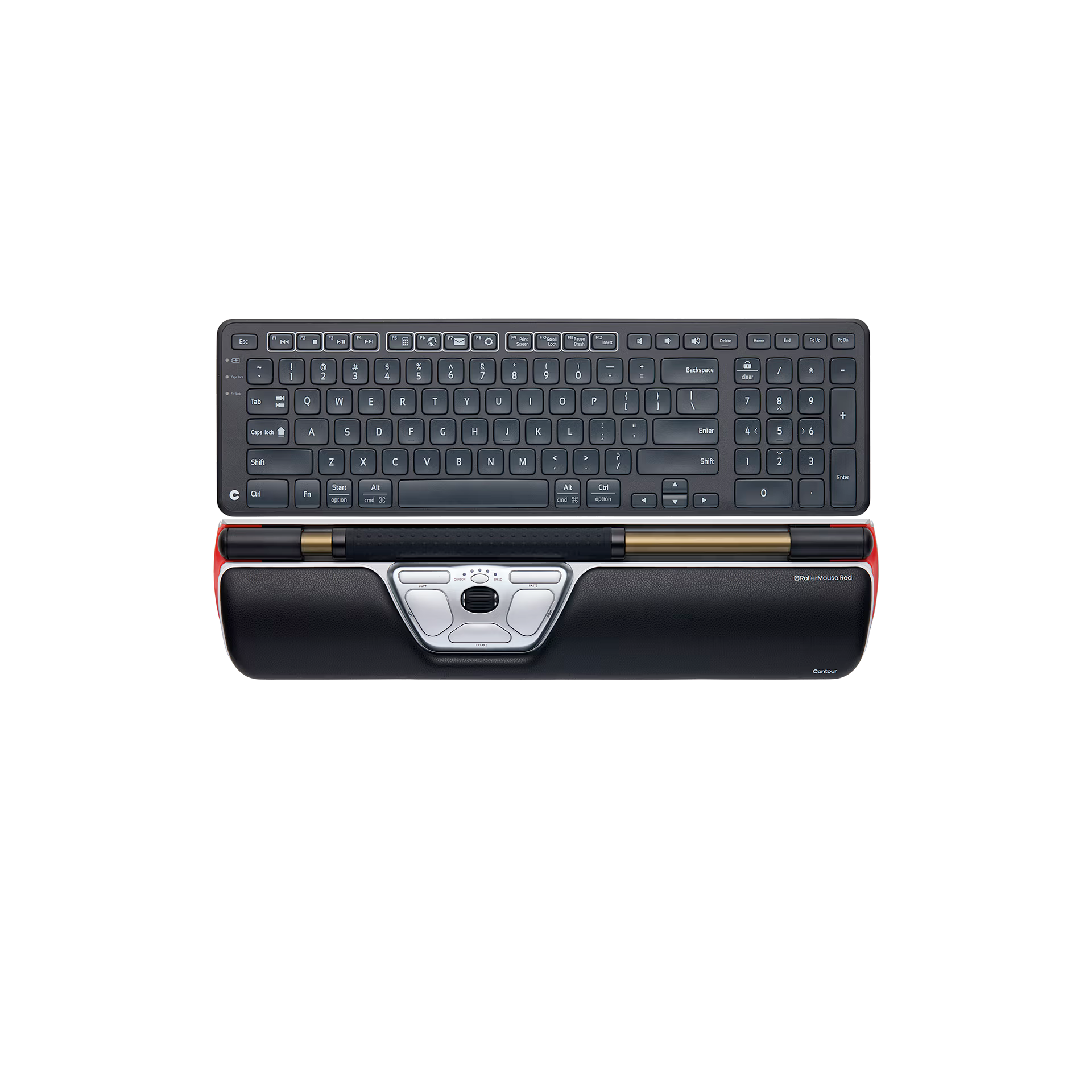
The RollerMouse Red and Balance Keyboard Black combo is the slim-palm-rest, all-black version of Contour's centred ergonomic workstation. The patented rollerbar mechanism is identical to the Plus and Max variants. The narrower palm rest gives you the same wrist support in a more compact build, sized for smaller hands and smaller desks.
Balance Keyboard Black pairs flush at matching height. Centred typing flows directly into centred navigation. Less desk space used, single colour palette, same neutral hand position.
Why You'll Like It
• Slim palm rest profile: same memory-foam support as the Plus, in a smaller, more compact form factor.
• Sized for smaller hands: the narrow palm rest sits more naturally under a smaller hand than the full Plus pad.
• Smaller desk footprint: ideal for compact workstations, home-office desks, and hot-desking setups.
• All-black aesthetic: the BK Balance Keyboard coordinates with the slim Red for a single-palette minimalist look.
• Matched height: Balance Keyboard sits flush with RollerMouse Red, eliminating the gap that triggers accidental rollerbar activations during typing.
• Patent-protected rollerbar with adjustable sensor resolution and rubber dots, identical to the Plus and Max variants.
• Compact keyboard layout includes a full 10-digit numeric keypad and shortcut keys without adding desk width.
• Adjustable negative tilt on the keyboard keeps your wrists in a healthy, natural position.
• Wireless on both devices, with up to 12 months keyboard battery life.
Support
Our documentation gets you up and running quickly and easily. If you have any questions use the links below or contact our support.
Getting Started
Frequently Asked Questions
Returns
Contact Support
As seen on





Everything you need for a pain-free workday, bundled and priced better together.
You don't need bulk to get pain relief. You need the right geometry, sized to your hand and your desk, in colours that disappear into your setup rather than fighting it.
The RollerMouse Red and Balance Keyboard Black combo brings the patented rollerbar and a width-matched companion keyboard into the same centrally-positioned setup, with a slim palm rest and an all-black colourway that takes less desk space than the Plus or Max combos. Centred pointing, centred typing, smaller footprint, single colour palette.
Exact Height Match
Balance Keyboard sits flush with RollerMouse Red, closing the gap between typing and mousing.
Compact But Complete
Narrow width reduces shoulder reach, with a full 10-digit numeric keypad and shortcut keys still on board.
Adjustable Negative Tilt
Customisable downward slope keeps your wrists in a healthy, natural typing position.
Plug & Play
Works instantly, wired or wireless. Up to 12 months keyboard battery life on the wireless model.

What This Pair Does Differently

RollerMouse Red's patent-protected rollerbar removes the need to reach for a side-mounted mouse, while Balance Keyboard's matched width keeps your typing centred. The combination targets shoulder, neck, wrist and forearm pain at the source.
Adjustable sensor resolution, rubber-dotted rollerbar, and adjustable click force deliver high pointer precision. The aluminium chassis keeps the rollerbar stable under pressure. Same precision specs as the Plus and Max variants.
Slim vegan-leather palm rest paired with the all-black Balance Keyboard. The combo takes less desk space than the Plus or Max combos, and the single colour palette suits minimalist setups where every element coordinates. Sized for smaller hands and smaller desks.
Memory-foam palm rest wrapped in vegan leather supports your palms during long sessions. The slim profile is sized for smaller hands or for users who prefer a less bulky wrist rest. Balance Keyboard's adjustable negative tilt keeps your wrists in a healthy, natural angle.
Balance Keyboard's narrow width reduces shoulder reach without sacrificing the full 10-digit numeric keypad and shortcut keys. Same productivity, smaller footprint.
For users who want the patented rollerbar mechanism in a more compact, all-black form factor — on smaller desks, in minimalist setups, where every centimetre and every shade counts.

Real people share how Contour changed their workday.
Answer a few quick questions, and we’ll match you with a device that works perfectly for your needs.

Got questions? We’ve got answers!
All Red variants use the same patent-protected rollerbar with adjustable sensor resolution, rubber-dotted grip, and aluminium chassis. The difference is the palm rest. The Slim combo (this page) has a thinner memory-foam pad sized for smaller hands and smaller desks, and ships with the all-black Balance Keyboard for a coordinated minimalist look. The Plus combo has a standard memory-foam pad. The Max variant has integrated arm support that extends further, for users with severe forearm issues or very long sessions.
Mousing with a centred rollerbar is different from a side-mounted mouse, but most people adjust within 1 to 2 days. The keyboard uses a standard layout, so typing feels familiar from day one.
The combo works on both Windows and Mac. It's plug-and-play on Windows. For Mac, RollerMouse Red drivers are available from the Contour support pages. Note that Balance Keyboard uses a Windows-standard key layout rather than an Apple layout, so Mac users get full functionality with familiar PC key positioning.
Most desk-related upper-body pain comes from reaching to the side for a mouse and from a keyboard that misaligns your wrists. The combo eliminates the side reach by centring the rollerbar in front of you, and supports your wrists with a memory-foam pad and adjustable keyboard tilt. RollerMouse Red is engineered for the highest level of pain relief and prevention across shoulder, neck, wrist and forearm.
Up to 12 months on the wireless model, with 2× AAA replaceable batteries. RollerMouse Red Wireless uses a rechargeable battery via USB-C.
We're here to help you!
