
Roller Ball Mice: An Honest Buyer's Guide
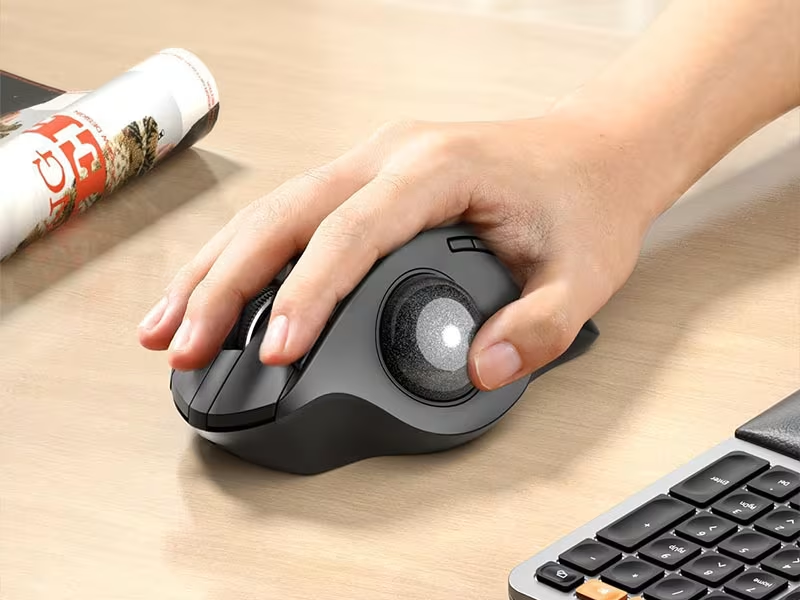
Roller ball mice are one of the most underrated fixes for desk-related wrist and shoulder pain. They are also one of the most misunderstood. If you spend 6–10 hours a day at a computer, you already know the slow burn: forearm tightness by mid-morning, a wrist that aches by Friday, and a dull shoulder knot that follows you home.
Here is the honest version most buying guides skip. A roller ball mouse does not fix everything. It fixes one specific thing very well, and whether that is the right thing for you depends on where your pain actually lives. This guide covers what roller ball mice are, what they genuinely solve, where they come up short, and the centered alternative worth knowing about if your main problem is your shoulder. For a broader overview, start with our guide to the best ergonomic mouse.
Key Takeaways
- Roller ball mice keep the device stationary while a ball moves the cursor, so your arm travels far less than it does with a traditional mouse.
- Less reach and less repetitive sweeping can lower wrist, forearm, and shoulder fatigue during long desk sessions.
- Most people feel clumsy at first. Plan on a short learning period and adjust the cursor speed before you judge comfort.
- Side-mounted roller ball mice shorten the reach but still park one hand off to the side, which only solves half the problem for shoulder pain.
- A centered rollerbar applies the same "device stays put" idea from the middle of the keyboard, which tends to help shoulder and neck strain more.
What Is a Roller Ball Mouse, and How Does It Work?

A roller ball mouse, usually called a trackball, is a stationary pointing device with an exposed ball set into a socket. You roll the ball with your thumb, fingers, or palm to move the cursor. The mouse body itself never travels across your desk.
Sensors inside the housing read the ball's rotation and turn it into cursor movement on screen. That single design choice is the whole point. The device stays put, so your arm does not have to chase it. Research on pointing devices suggests that different designs change how much muscle activity the forearm and shoulder produce, which is exactly why the device under your hand matters when you are trying to reduce strain, not just push through it, as a CDC pointing device study explored.
Why a Traditional Mouse Wears You Down
A standard mouse sits off to the side of your keyboard. Every time you move from typing to pointing, your hand leaves the home row and your whole arm swings out to meet it. That sideways trip runs roughly 12–18 inches each way. Do it a few hundred times a day and the shoulder that powers the reach starts to complain.
That is the chain a roller ball mouse tries to break. The reach fires the shoulder, the shoulder tightens, and by afternoon the strain shows up further down the arm at the wrist and forearm. Keeping the device still removes most of that travel, which is why so many people feel the difference within a week.
What Roller Ball Mice Actually Fix
The biggest win is simple: far less arm movement. Because the device is anchored, your fingers or thumb do the work that your whole arm used to do. For long spreadsheet sessions, document editing, and general office work, that adds up to a lot less repetitive motion.
Two smaller wins come along for the ride. A roller ball mouse needs almost no desk space, since it never slides anywhere. And that fixed footprint is genuinely handy in tight or multi-monitor setups, where a traditional mouse runs out of mat halfway across the screen.
Mostly wrist and forearm tightness? A roller ball mouse is a reasonable first move, because it cuts the repetitive sweeping that loads those tissues all day.
Where Roller Ball Mice Fall Short
Here is the part most trackball guides leave out. A roller ball mouse keeps your hand still, but on most models that hand is still parked off to one side of your keyboard. The reach is shorter, not gone. If your main complaint is the wrist, that may be enough. If your main complaint is the shoulder, a side-mounted ball only solves half the problem.
Thumb-operated trackballs add a second catch. They ask one small joint to handle a lot of repetitive work. If you already have thumb pain or a tender thumb joint, a thumb ball can trade one ache for another.
And there is a learning curve. Most people feel clumsy for the first few days while the spin-and-stop motion becomes muscle memory. If you want a fuller breakdown of the trade-offs before you commit, this computer mouse roller ball overview walks through the pros, cons, and adjustment period.
Rollerbar vs Roller Ball: The Centered Alternative
If the side-mounted part is the real problem, there is a different way to apply the same idea. Keep the device stationary, but move it to the center.
This is where it helps to know the difference between a roller ball mouse and a rollerbar, because they are not the same device. A roller ball mouse uses a ball you spin off to one side. A rollerbar sits in front of your keyboard, just below the spacebar, and you move the cursor by rolling and sliding a bar with your fingertips. Same core trick, the device stays put. Different execution: it is centered, and you reach it from either hand.
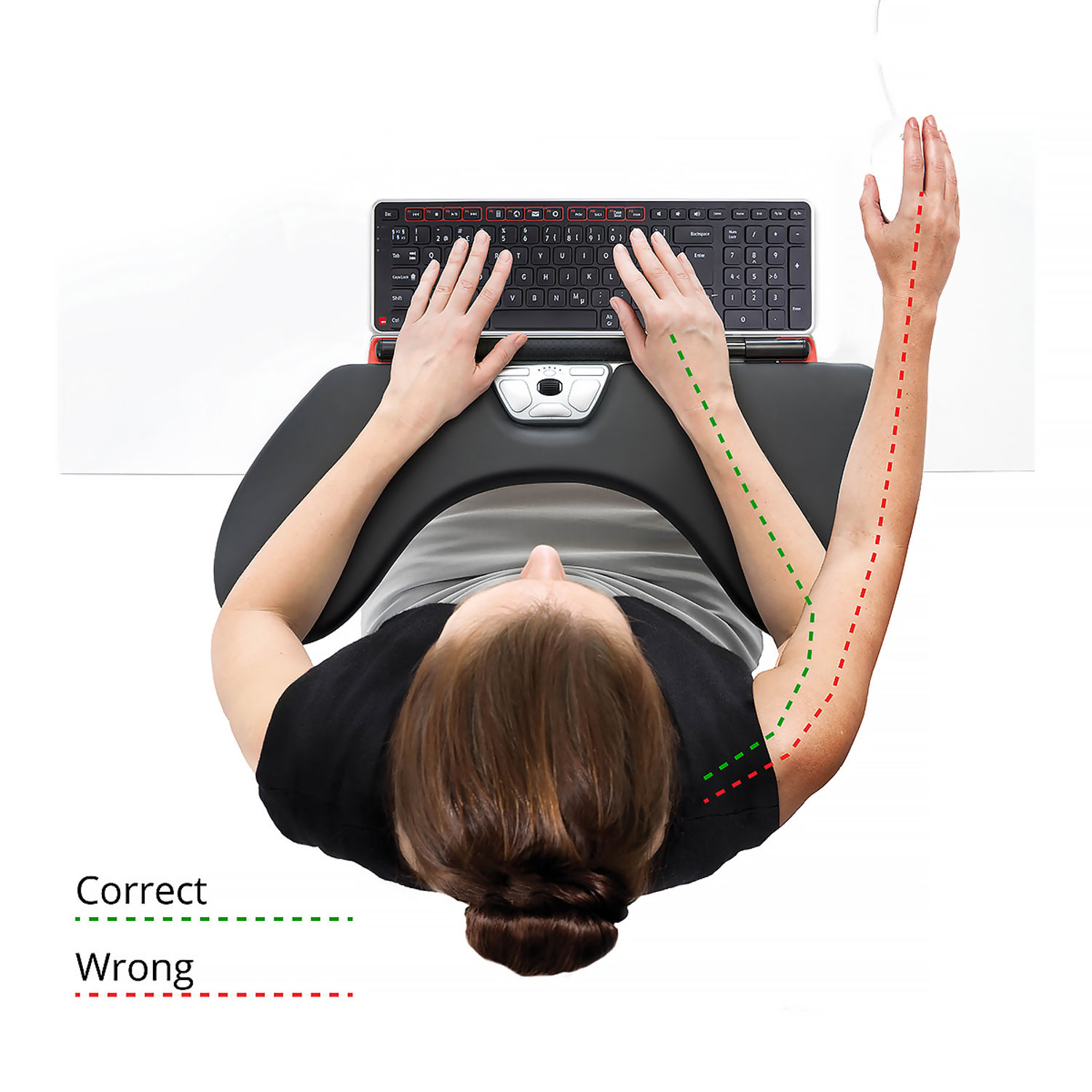
Contour Design does not make a trackball. What it makes is the centered category, led by the RollerMouse Red. Because the bar sits centered, you reach it from a neutral position with either hand, and that 12–18 inch sideways trip disappears. For people whose pain pattern is shoulder, neck, or "it started at my wrist and crept up my arm," that centered placement tends to do more than swapping one side mouse for another. If you want the reasoning behind that, this look at the benefits of a centered mouse lays out the mechanics.
Two honest caveats keep this useful. For sub-pixel design, photo retouching, or CAD work, a handheld mouse still gives the best fingertip control, and Contour's pick there is the adjustable UniMouse, not a centered bar. And no single device covers every task for every person, so pairing a precision mouse with a centered device for everyday work is a perfectly normal setup.
Who Should Use a Roller Ball Mouse, and Who Shouldn't
Being honest about fit saves you time and money. A roller ball mouse is the right call for a specific kind of user and the wrong call for others. If you're ready to switch, consider the wireless RollerMouse Red.
A roller ball mouse fits you if:
- You work at a desk 6 or more hours a day in roles like engineering, accounting, writing, design, or content editing.
- You have wrist pain, forearm tension, or early signs of repetitive strain and want to cut down on arm travel.
- You want to prevent trouble before symptoms get serious.
- Your desk space is limited or you run multiple monitors.
It is probably not your best pick if:
- Your work leans on fast-action gaming, 3D modeling, or rapid wide-cursor movement.
- You travel constantly and need an ultra-portable setup.
- You already have thumb joint pain and want to avoid a thumb-operated style.
If your symptoms sit mostly in the shoulder or neck, it is worth weighing a roller ball mouse against options built for mouse use and shoulder pain specifically, since that is where a centered design usually pulls ahead.
How to Choose the Right Roller Ball Mouse
Not all roller ball mice feel the same, and the differences matter more than most buyers expect.
Ball size and placement are the first calls to make. A larger ball can feel more controlled for fine cursor work. Thumb-operated models feel familiar fast for right-handed users, while finger-operated models spread the effort across more of the hand. For a deeper read on fit and comfort across styles, this ergonomic roller ball mouse guide compares the trade-offs.
Then check the practical features: adjustable cursor speed for multi-monitor work, smooth scrolling, enough programmable buttons for your workflow, and OS compatibility for Windows, macOS, and Linux.
Still stuck between a side-mounted ball, a centered bar, and a handheld vertical mouse? Match the device to your pain pattern, not the review count. Our Help Me Choose tool walks you through it in a couple of minutes.

How to Make the Switch
Whichever device you land on, give the change a fair trial. Here is a simple way to do it.
- Commit to a two-week trial. Muscle memory needs about that long before comfort and accuracy settle.
- Lower the cursor speed for the first few days, then raise it once your aim sharpens. Slow first builds control.
- Place the device directly in front of you, so your forearms rest on the desk with little to no wrist angle.
- Keep your elbows close to your sides, bent near a 90-degree angle, rather than reaching forward or out.
- Take a short movement break each hour. Stand, roll your shoulders back, and let the arm reset.
For placement, posture, and sensitivity details beyond the hardware itself, this guide to reduce pain with an ergonomic mouse is a useful checklist.
This article is general information, not medical advice. If pain is sharp, spreading, or not improving, see a clinician. For more on the shoulder side of this, read about why mouse use causes shoulder pain.
Frequently Asked Questions About Roller Ball Mice
What is a roller ball mouse and how does it reduce wrist strain?
A roller ball mouse, or trackball, is a stationary device where you roll an exposed ball with your fingers or thumb while the body stays fixed on your desk. Unlike a traditional mouse that needs constant arm movement, it keeps your hand in one place and cuts the repetitive sweeping that loads the wrist and forearm.
How long does it take to get comfortable using a roller ball mouse?
Most people need a short adjustment period to build the spin-and-stop technique. A two-week trial is a practical window for deciding whether the motion style fits your daily workflow.
Are roller ball mice better than traditional mice for office work?
For screen-heavy office work, a roller ball mouse can reduce arm travel, save desk space, and improve comfort over long sessions. They are less suited to tasks that need fast, wide cursor movement, like competitive gaming or some 3D modeling.
What is the difference between a roller ball mouse and a rollerbar?
A roller ball mouse uses a ball you spin, usually mounted to one side. A rollerbar, like the Contour RollerMouse, sits centered in front of the keyboard and moves the cursor with a sliding bar you reach from either hand. Both keep the device stationary, but only the centered bar removes the sideways reach.
Can roller ball mice help with repetitive strain?
They can reduce one common driver of desk-related strain: repeated arm travel and awkward wrist angles during long sessions. If you already have active pain, pair any device change with broader workstation adjustments rather than treating the device as a cure.
Why do centered designs work better for shoulder pain?
A centered design keeps cursor control in front of the keyboard, which cuts the asymmetry and reach that fire the shoulder all day. For people whose main issue is shoulder or neck tension, that centered placement is often a bigger win than switching between side-mounted devices.
Your Next Move
Pick the device that matches where your pain actually is, then give it two honest weeks. If the wrist is the story, a roller ball mouse is a smart, low-cost place to start. If the shoulder keeps showing up, try a centered rollerbar and feel the reach disappear. Either way, you are about to spend a lot fewer hours fighting your own desk.

Which Device Is Right for You?
Take a quick quiz and get a personalized recommendation based on how you work.

