
The Best Mouse to Prevent Carpal Tunnel: What to Look For and Why It Matters
The Best Mouse to Prevent Carpal Tunnel: What to Look For and Why It Matters
Your mouse might be one of the quietest threats to your long-term health. If you spend 6–10 hours a day clicking, scrolling, and dragging, the way you hold that device matters far more than most people realize. Carpal tunnel syndrome affects many adults, and repetitive mouse use is a well-documented contributing factor. For a broader comparison of in-cluster options, see best mouse options for carpal tunnel.

Key Takeaways
- A mouse to prevent carpal tunnel should support a more neutral wrist posture to reduce pronation strain during long desk sessions.
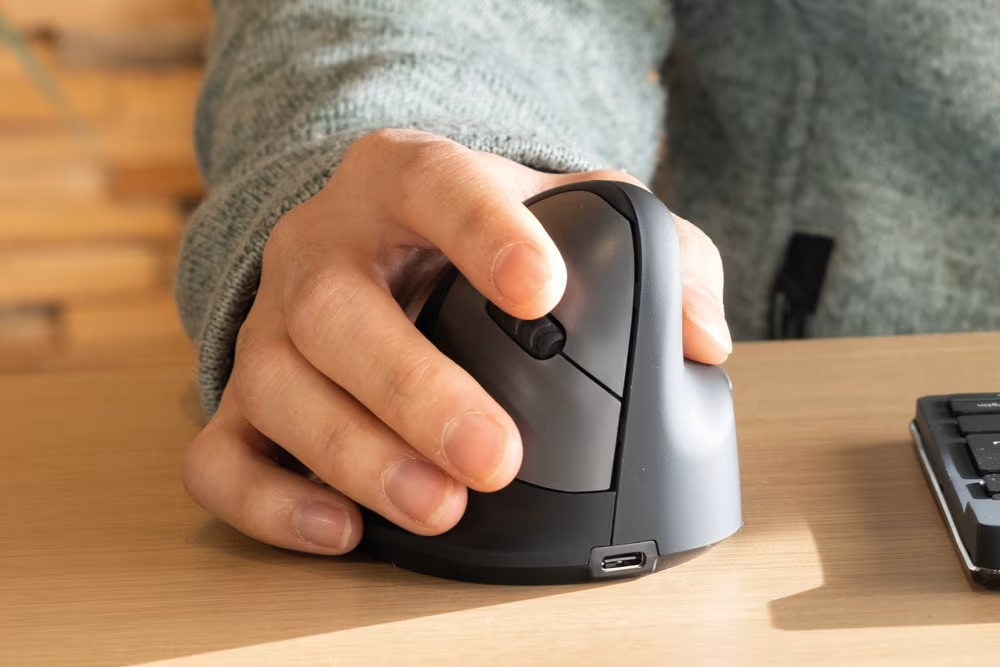
- Vertical mice are a strong ergonomic option for carpal tunnel prevention because they reduce forearm pronation and can help decrease wrist deviation.
- Trackball and centered roller designs reduce repeated wrist sweeping motion by keeping the device stationary or centered in front of the keyboard.
- Grip style and hand position matter more than price; proper geometry usually beats extra features.
- Avoid using wrist rests while actively mousing; keep your wrist floating and move from the elbow and shoulder instead.
How Your Mouse May Be Contributing to Carpal Tunnel Syndrome
Most standard flat mice force your forearm into full pronation, meaning your palm faces straight down toward the desk. When you add wrist extension (bending your wrist upward to reach the mouse), repeated clicking pressure, and four-plus hours of daily use, that compression can become chronic. The result: pain, numbness, and tingling that often starts at night before showing up during the workday. For a broader overview, start with our guide to the best ergonomic mouse.
Research on work-related upper limb disorders highlights how repetitive hand and wrist movements contribute to higher rates of upper-limb musculoskeletal conditions in office workers.
Try this today: Lay your arm flat on your desk and notice whether your palm faces down or inward. If it's fully pronated, your mouse grip is likely contributing to strain.
What Makes an Ergonomic Mouse Effective at Preventing Carpal Tunnel
An ergonomic mouse works by reducing pronation and supporting a neutral wrist posture. When your hand rotates into a more neutral "handshake" position, median nerve pressure may drop for some users.
A guide on reducing pain with an ergonomic mouse outlines the core principle: the goal isn't just a different shape. It's a sustained neutral wrist posture throughout the workday. That requires the right combination of tilt, grip shape, and movement range.
Key Features to Look For: Tilt, Shape, and Range of Motion
Tilt is a critical variable. A mouse with a stronger vertical tilt often reduces pronation strain by rotating the forearm toward a more neutral position.
Shape determines how much grip tension your hand generates. Look for a contoured body, a stable thumb rest, and a size that lets fingers rest without curling.
Range of motion is often overlooked. Trackball designs reduce wrist sweeping by keeping the base stationary, and centered roller designs keep the pointing device at the midline so you avoid side reach.
One thing to avoid: wrist rests placed under an active mouse hand. The CCOHS guidance on wrist rests notes that rests are intended for pauses in activity, not for use while mousing. Keep your wrist floating and move from the elbow and shoulder instead.
Types of Ergonomic Mice and How They Compare
Not all ergonomic mice solve the same problem. Choosing the wrong type for your specific condition can mean spending money on a device that doesn't help. A Cochrane review on ergonomic interventions suggests no single device is universally superior across office workers, so the best approach usually combines the right tool with setup improvements and movement variety.
Vertical Mice, Trackballs, and Centralized Roller Designs
Vertical mice rotate the hand toward a handshake grip, reducing pronation and often reducing ulnar deviation (sideways wrist bend). If you want a vertical option designed for adjustability, the Contour UniMouse is a vertical-style option with adjustable tilt. Prefer a cable-free setup? Take a look at the wireless RollerMouse Red.

Trackball mice keep the device stationary while your thumb or fingers move the ball. This reduces repeated wrist sweeping motion and can be a strong fit for broader RSI patterns. For an in-cluster overview of this option, see ergonomic mouse roller ball.
Centered roller designs place cursor control directly in front of the keyboard, which keeps both arms more symmetric and reduces side reach. For examples and setup considerations, see mouse roller designs.

How to Choose the Right Ergonomic Mouse for Your Work Style
The right mouse to prevent carpal tunnel depends on your primary symptom, your daily usage pattern, and your grip style. As a practical starting point, prioritize a more neutral wrist posture, reduce reach distance, and choose a device that you can use consistently without over-gripping.
Price doesn't predict performance. A correctly angled mouse with the right fit can outperform more expensive options if it keeps your wrist neutral and your grip relaxed.
Transition matters. Give any new device at least 1–2 weeks so your muscles and habits adapt. If symptoms worsen sharply or persist, consider consulting a clinician.
If you're not sure which ergonomic mouse to choose, our Help Me Choose Tool narrows it down and finds the mouse that fits you in under a minute.
Conclusion
No single mouse guarantees carpal tunnel prevention. But the right device, matched to your grip, symptoms, and hours of use, can make a meaningful difference. Start with a vertical or centered design, keep your wrist floating, and pair the device with workstation improvements and movement breaks.

Frequently Asked Questions About Mice and Carpal Tunnel Prevention
What is carpal tunnel syndrome and how does mouse use contribute to it?
Carpal tunnel syndrome (CTS) occurs when the median nerve compresses in the wrist. Standard flat mice can encourage pronated forearm posture and awkward wrist angles. Combined with long daily use, this can contribute to chronic strain patterns for some users. It also helps to pair the right hardware with these mouse arm syndrome exercises you can do at your desk.
How much can an ergonomic mouse reduce carpal tunnel pressure?
An ergonomic mouse that supports a neutral "handshake" posture may reduce pronation-related strain for some users, but results vary. Technique and workstation setup matter as much as device shape.
What are the most important features to look for in a mouse to prevent carpal tunnel?
Prioritize neutral wrist posture, reduced pronation, a comfortable grip that avoids over-tension, and a movement style that reduces repeated wrist sweeping. Avoid using a wrist rest while actively mousing.
Are vertical mice or trackball mice better for carpal tunnel prevention?
Vertical mice are often chosen to reduce pronation, while trackballs reduce wrist sweeping by keeping the device stationary. The better choice depends on your symptoms, grip style, and daily work pattern.
How long does it take to see improvement after switching to an ergonomic mouse?
Many users need 1–2 weeks to adjust. Track comfort and symptoms over time, and reassess if pain worsens or does not improve after a reasonable trial.
Should I use a wrist rest while using an ergonomic mouse?
No. Wrist rests are best used during pauses, not during active mousing. During use, keep your wrist floating and move from the elbow and shoulder to avoid compressing the wrist from below.

Which Device Is Right for You?
Take a quick quiz and get a personalized recommendation based on how you work.

